
Lypii Apps
RomaTalk

First Then Board Examples: Three Everyday Situations

Three first then board examples, card by card: shoes before the playground, bath before a story, the doctor before a cookie. Set them up in RomaTalk.

Some moments in the day go wrong for a very simple reason: your child doesn't know what comes after the thing you're asking for. Shoes on, and then what? A First Then board answers that question with two pictures. Below you'll find why the idea helps many children, then three first then board examples, card by card, set up in RomaTalk.

My son Roma is autistic and does not speak. Predictability helps him: a familiar order of events calms him. That's one of the reasons RomaTalk has schedules at all, and why it can show just two steps at a time.

What is a First Then board?

A First Then board shows two things side by side: what happens first, and what happens next. It's the smallest possible visual schedule, which is exactly why it suits a child who isn't ready for a longer one yet.

Usually the "first" is the less loved task and the "then" is something your child enjoys. The University of New Mexico Center for Development and Disability puts it plainly: it works best when the first is the less preferred activity and the then is a motivating one.

Why "first this, then that" helps

The UNM tip sheet lists what these boards can help with, including moving between activities, learning routines and supporting understanding of spoken language. A Vanderbilt Kennedy Center overview adds that the board makes clear what is expected and gives a visual reminder of what comes after. More broadly, visual supports are listed as an evidence-based practice in the AFIRM visual supports materials from the University of North Carolina.

No board works for every child on every day. But many families find that two clear pictures make a hard moment calmer.

How First → Then works in RomaTalk

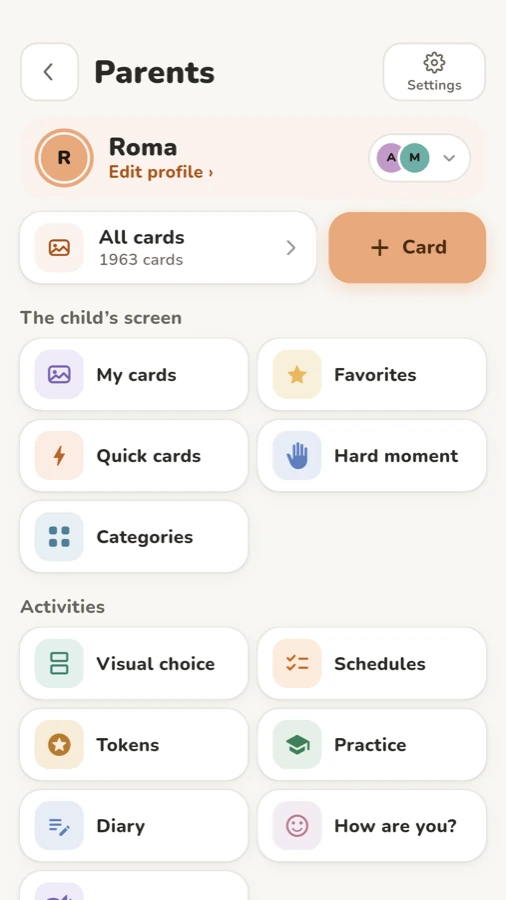
In RomaTalk, a First Then board is a schedule set to show two steps. You build it in Parents › Schedules: picture steps, days and a time window. Under “When and how” there's a setting called “How many steps to show” with three options: “One step”, “First → Then” and “All steps”. With “First → Then”, your child sees the current step and the one after it, labelled “First” and “Then”.
RomaTalk parent area with the Schedules button under Activities
Schedules live in the parent area, under Activities.

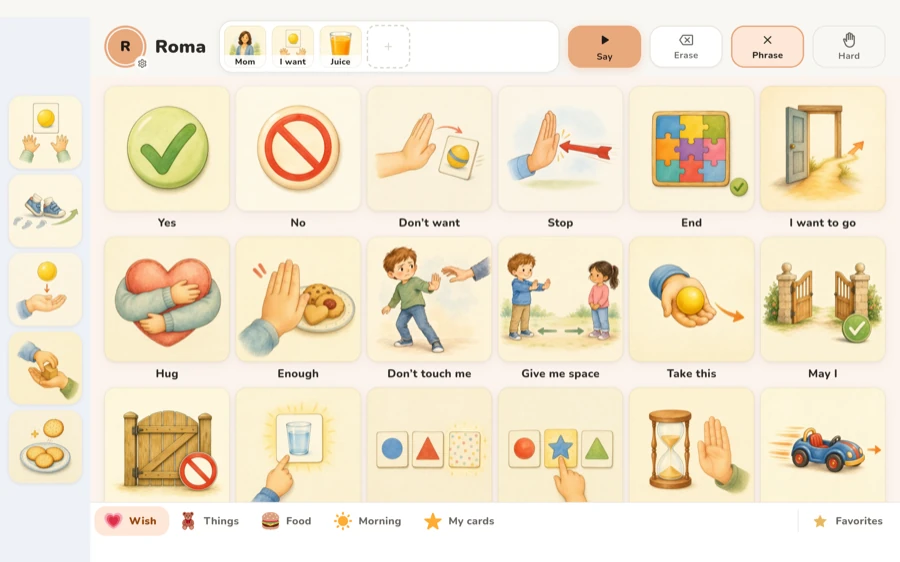
At the chosen time, a schedule block appears above your child's cards, and tapping it opens the schedule. Your child taps “Done” on the current step, and it moves to the “Done” strip. Only the current step can be checked off, and a step checked off by mistake can be unchecked right away. Tapping a step's picture speaks its name.

Two more pieces are useful for First Then boards:

  • “Wait time”. Next to “Add a step” there's a “Wait time” button. A “Wait” step shows a dial and the time left. It runs and ends by itself, with nothing to check off.
  • The “Now → then” widget. On Android and iPhone you can put a home screen widget that shows the step happening now and the next one. If you turn on “Mark steps on the widget” in Parents › Settings, it gets a “Done” button, so the current step can be marked without opening the app.

For a one-off moment, open the schedule's menu in the list and choose “Start now”. The block appears on your child's home screen right away and stays until every step is done.
RomaTalk schedules list with Morning and Evening routines shown as picture steps
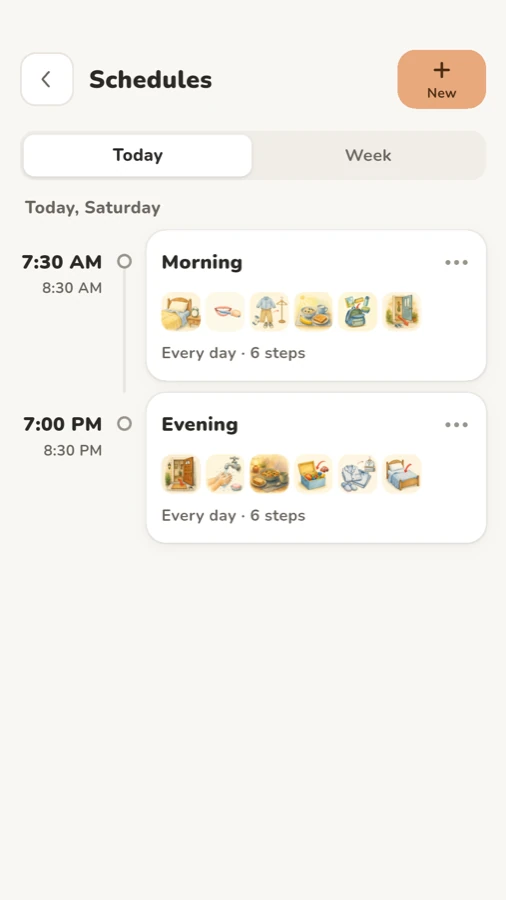
The schedules list. A First Then pair is simply a schedule with two steps.

Three first then board examples, card by card

All three use cards already in the RomaTalk library: search for the word in the step picker.

Example 1: First shoes, then playground

  • First: “Put on shoes”
  • Then: “Playground” (or “Swing”, if that's the part your child loves)

Set it up like this:

  1. Open Parents › Schedules and tap “New” (or “Create your own” if the list is empty).
  2. Give it a name, for example “Going out”.
  3. Tap “Add a step”, search for “Put on shoes” and pick it. Add “Playground” the same way.
  4. In “When and how”, choose the days and the time, and under “How many steps to show” pick “First → Then”.
  5. Tap “See it as your child will” to check it, then “Save”.

How to present it calmly: sit beside your child with the shoes already by the door. Point to each picture as you say "First shoes, then playground." Then say less. Let the screen do the repeating.

Example 2: First bath, then a story

  • First: “Get in the bath”
  • Then: “Read” or “Picture books” (or “Tablet”, if screen time is the real draw in your house)

Evenings are tired times, so keep your words short. Show the pair before you run the water, not when your child is already upset at the bathroom door. After the bath, your child taps “Done”. Then go and read, straight away.

For a whole sequence, see the morning routine article.

Example 3: First the doctor, then a cookie

  • First: “Doctor”
  • Then: “Cookie” (or “Snack”)

A doctor visit rarely starts on time, which is where “Wait time” helps. You can add a “Wait” step before “Doctor” and set “How long to wait”, for example five minutes. The dial counts down on its own, so your child sees that waiting has an end. Only two steps show at once: first the wait and the doctor, then the doctor and the cookie.

Use “Start now” in the waiting room, since a clinic doesn't keep to your clock. A photo of your own doctor's door works even better than a drawing: see AAC cards with your own photos.
Child home screen in RomaTalk on a tablet with picture cards and a phrase bar
Your child's home screen. A running schedule appears as a block above the cards.

Tips for making these first then board examples work

Make the "then" genuinely motivating. The Vanderbilt overview says the picture in the then box should always be something the child enjoys, and suggests changing it often so it keeps its pull. If the playground has lost its shine, swap the card.

Keep it to two steps. UNM suggests moving to a multistep schedule only when there are more than two activities to show. In RomaTalk that's one setting away: change “First → Then” to “All steps”.

Follow through every time. Both tip sheets say to offer the reward as soon as the first task is done. If the board says cookie, the cookie comes.

Use your own photos. Your child's own shoes, the swing in your street, the cookie tin in grandma's kitchen. With Roma, I started showing photos from my phone because ready-made cards didn't always fit his life.

Practise when things are easy. UNM recommends starting when you and your child are at your best. Try a pair with two pleasant steps first, so the screen itself feels friendly.

Frequently asked questions

What are good first then board examples to start with?

Pick a short task your child finds a little hard, then something they really like: shoes, then playground, or bath, then a book. Use pictures they recognise, ideally your own photos.

How is a First Then board different from a visual schedule?

A First Then board shows only two steps. A visual schedule shows a longer sequence, like a whole morning. In RomaTalk the same schedule can show one step, two steps or all of them.

Can my child mark steps without opening the app?

Yes, if you add the “Now → then” home screen widget and turn on “Mark steps on the widget” in Parents › Settings. The widget then shows a “Done” button for the current step.

Is it free?

All ready-made cards and the schedules feature are in the free version, with up to 2 schedules of your own. Pro is a one-time purchase that removes the limits. You can download RomaTalk or read more on the RomaTalk home page.
Lypii Apps
RomaTalk

First Then Board Examples: Three Everyday Situations

Three first then board examples, card by card: shoes before the playground, bath before a story, the doctor before a cookie. Set them up in RomaTalk.

Some moments in the day go wrong for a very simple reason: your child doesn't know what comes after the thing you're asking for. Shoes on, and then what? A First Then board answers that question with two pictures. Below you'll find why the idea helps many children, then three first then board examples, card by card, set up in RomaTalk.

My son Roma is autistic and does not speak. Predictability helps him: a familiar order of events calms him. That's one of the reasons RomaTalk has schedules at all, and why it can show just two steps at a time.

What is a First Then board?

A First Then board shows two things side by side: what happens first, and what happens next. It's the smallest possible visual schedule, which is exactly why it suits a child who isn't ready for a longer one yet.

Usually the "first" is the less loved task and the "then" is something your child enjoys. The University of New Mexico Center for Development and Disability puts it plainly: it works best when the first is the less preferred activity and the then is a motivating one.

Why "first this, then that" helps

The UNM tip sheet lists what these boards can help with, including moving between activities, learning routines and supporting understanding of spoken language. A Vanderbilt Kennedy Center overview adds that the board makes clear what is expected and gives a visual reminder of what comes after. More broadly, visual supports are listed as an evidence-based practice in the AFIRM visual supports materials from the University of North Carolina.

No board works for every child on every day. But many families find that two clear pictures make a hard moment calmer.

How First → Then works in RomaTalk

In RomaTalk, a First Then board is a schedule set to show two steps. You build it in Parents › Schedules: picture steps, days and a time window. Under “When and how” there's a setting called “How many steps to show” with three options: “One step”, “First → Then” and “All steps”. With “First → Then”, your child sees the current step and the one after it, labelled “First” and “Then”.

RomaTalk parent area with the Schedules button under Activities
Schedules live in the parent area, under Activities.

At the chosen time, a schedule block appears above your child's cards, and tapping it opens the schedule. Your child taps “Done” on the current step, and it moves to the “Done” strip. Only the current step can be checked off, and a step checked off by mistake can be unchecked right away. Tapping a step's picture speaks its name.

Two more pieces are useful for First Then boards:

  • “Wait time”. Next to “Add a step” there's a “Wait time” button. A “Wait” step shows a dial and the time left. It runs and ends by itself, with nothing to check off.
  • The “Now → then” widget. On Android and iPhone you can put a home screen widget that shows the step happening now and the next one. If you turn on “Mark steps on the widget” in Parents › Settings, it gets a “Done” button, so the current step can be marked without opening the app.

For a one-off moment, open the schedule's menu in the list and choose “Start now”. The block appears on your child's home screen right away and stays until every step is done.

RomaTalk schedules list with Morning and Evening routines shown as picture steps
The schedules list. A First Then pair is simply a schedule with two steps.

Three first then board examples, card by card

All three use cards already in the RomaTalk library: search for the word in the step picker.

Example 1: First shoes, then playground

  • First: “Put on shoes”
  • Then: “Playground” (or “Swing”, if that's the part your child loves)

Set it up like this:

  1. Open Parents › Schedules and tap “New” (or “Create your own” if the list is empty).
  2. Give it a name, for example “Going out”.
  3. Tap “Add a step”, search for “Put on shoes” and pick it. Add “Playground” the same way.
  4. In “When and how”, choose the days and the time, and under “How many steps to show” pick “First → Then”.
  5. Tap “See it as your child will” to check it, then “Save”.

How to present it calmly: sit beside your child with the shoes already by the door. Point to each picture as you say "First shoes, then playground." Then say less. Let the screen do the repeating.

Example 2: First bath, then a story

  • First: “Get in the bath”
  • Then: “Read” or “Picture books” (or “Tablet”, if screen time is the real draw in your house)

Evenings are tired times, so keep your words short. Show the pair before you run the water, not when your child is already upset at the bathroom door. After the bath, your child taps “Done”. Then go and read, straight away.

For a whole sequence, see the morning routine article.

Example 3: First the doctor, then a cookie

  • First: “Doctor”
  • Then: “Cookie” (or “Snack”)

A doctor visit rarely starts on time, which is where “Wait time” helps. You can add a “Wait” step before “Doctor” and set “How long to wait”, for example five minutes. The dial counts down on its own, so your child sees that waiting has an end. Only two steps show at once: first the wait and the doctor, then the doctor and the cookie.

Use “Start now” in the waiting room, since a clinic doesn't keep to your clock. A photo of your own doctor's door works even better than a drawing: see AAC cards with your own photos.

Child home screen in RomaTalk on a tablet with picture cards and a phrase bar
Your child's home screen. A running schedule appears as a block above the cards.

Tips for making these first then board examples work

Make the "then" genuinely motivating. The Vanderbilt overview says the picture in the then box should always be something the child enjoys, and suggests changing it often so it keeps its pull. If the playground has lost its shine, swap the card.

Keep it to two steps. UNM suggests moving to a multistep schedule only when there are more than two activities to show. In RomaTalk that's one setting away: change “First → Then” to “All steps”.

Follow through every time. Both tip sheets say to offer the reward as soon as the first task is done. If the board says cookie, the cookie comes.

Use your own photos. Your child's own shoes, the swing in your street, the cookie tin in grandma's kitchen. With Roma, I started showing photos from my phone because ready-made cards didn't always fit his life.

Practise when things are easy. UNM recommends starting when you and your child are at your best. Try a pair with two pleasant steps first, so the screen itself feels friendly.

Frequently asked questions

What are good first then board examples to start with?

Pick a short task your child finds a little hard, then something they really like: shoes, then playground, or bath, then a book. Use pictures they recognise, ideally your own photos.

How is a First Then board different from a visual schedule?

A First Then board shows only two steps. A visual schedule shows a longer sequence, like a whole morning. In RomaTalk the same schedule can show one step, two steps or all of them.

Can my child mark steps without opening the app?

Yes, if you add the “Now → then” home screen widget and turn on “Mark steps on the widget” in Parents › Settings. The widget then shows a “Done” button for the current step.

Is it free?

All ready-made cards and the schedules feature are in the free version, with up to 2 schedules of your own. Pro is a one-time purchase that removes the limits. You can download RomaTalk or read more on the RomaTalk home page.

ABOUT THIS APPRomaTalkTap a picture to hear the word, or put several cards together to say a whole phrase. Add your own photos and voice, and use RomaTalk offline.
SHARE
Lypii AppsContact
RomaTalk

First Then Board Examples: Three Everyday Situations

Three first then board examples, card by card: shoes before the playground, bath before a story, the doctor before a cookie. Set them up in RomaTalk.

Some moments in the day go wrong for a very simple reason: your child doesn't know what comes after the thing you're asking for. Shoes on, and then what? A First Then board answers that question with two pictures. Below you'll find why the idea helps many children, then three first then board examples, card by card, set up in RomaTalk.

My son Roma is autistic and does not speak. Predictability helps him: a familiar order of events calms him. That's one of the reasons RomaTalk has schedules at all, and why it can show just two steps at a time.

What is a First Then board?

A First Then board shows two things side by side: what happens first, and what happens next. It's the smallest possible visual schedule, which is exactly why it suits a child who isn't ready for a longer one yet.

Usually the "first" is the less loved task and the "then" is something your child enjoys. The University of New Mexico Center for Development and Disability puts it plainly: it works best when the first is the less preferred activity and the then is a motivating one.

Why "first this, then that" helps

The UNM tip sheet lists what these boards can help with, including moving between activities, learning routines and supporting understanding of spoken language. A Vanderbilt Kennedy Center overview adds that the board makes clear what is expected and gives a visual reminder of what comes after. More broadly, visual supports are listed as an evidence-based practice in the AFIRM visual supports materials from the University of North Carolina.

No board works for every child on every day. But many families find that two clear pictures make a hard moment calmer.

How First → Then works in RomaTalk

In RomaTalk, a First Then board is a schedule set to show two steps. You build it in Parents › Schedules: picture steps, days and a time window. Under “When and how” there's a setting called “How many steps to show” with three options: “One step”, “First → Then” and “All steps”. With “First → Then”, your child sees the current step and the one after it, labelled “First” and “Then”.

RomaTalk parent area with the Schedules button under Activities
Schedules live in the parent area, under Activities.

At the chosen time, a schedule block appears above your child's cards, and tapping it opens the schedule. Your child taps “Done” on the current step, and it moves to the “Done” strip. Only the current step can be checked off, and a step checked off by mistake can be unchecked right away. Tapping a step's picture speaks its name.

Two more pieces are useful for First Then boards:

  • “Wait time”. Next to “Add a step” there's a “Wait time” button. A “Wait” step shows a dial and the time left. It runs and ends by itself, with nothing to check off.
  • The “Now → then” widget. On Android and iPhone you can put a home screen widget that shows the step happening now and the next one. If you turn on “Mark steps on the widget” in Parents › Settings, it gets a “Done” button, so the current step can be marked without opening the app.

For a one-off moment, open the schedule's menu in the list and choose “Start now”. The block appears on your child's home screen right away and stays until every step is done.

RomaTalk schedules list with Morning and Evening routines shown as picture steps
The schedules list. A First Then pair is simply a schedule with two steps.

Three first then board examples, card by card

All three use cards already in the RomaTalk library: search for the word in the step picker.

Example 1: First shoes, then playground

  • First: “Put on shoes”
  • Then: “Playground” (or “Swing”, if that's the part your child loves)

Set it up like this:

  1. Open Parents › Schedules and tap “New” (or “Create your own” if the list is empty).
  2. Give it a name, for example “Going out”.
  3. Tap “Add a step”, search for “Put on shoes” and pick it. Add “Playground” the same way.
  4. In “When and how”, choose the days and the time, and under “How many steps to show” pick “First → Then”.
  5. Tap “See it as your child will” to check it, then “Save”.

How to present it calmly: sit beside your child with the shoes already by the door. Point to each picture as you say "First shoes, then playground." Then say less. Let the screen do the repeating.

Example 2: First bath, then a story

  • First: “Get in the bath”
  • Then: “Read” or “Picture books” (or “Tablet”, if screen time is the real draw in your house)

Evenings are tired times, so keep your words short. Show the pair before you run the water, not when your child is already upset at the bathroom door. After the bath, your child taps “Done”. Then go and read, straight away.

For a whole sequence, see the morning routine article.

Example 3: First the doctor, then a cookie

  • First: “Doctor”
  • Then: “Cookie” (or “Snack”)

A doctor visit rarely starts on time, which is where “Wait time” helps. You can add a “Wait” step before “Doctor” and set “How long to wait”, for example five minutes. The dial counts down on its own, so your child sees that waiting has an end. Only two steps show at once: first the wait and the doctor, then the doctor and the cookie.

Use “Start now” in the waiting room, since a clinic doesn't keep to your clock. A photo of your own doctor's door works even better than a drawing: see AAC cards with your own photos.

Child home screen in RomaTalk on a tablet with picture cards and a phrase bar
Your child's home screen. A running schedule appears as a block above the cards.

Tips for making these first then board examples work

Make the "then" genuinely motivating. The Vanderbilt overview says the picture in the then box should always be something the child enjoys, and suggests changing it often so it keeps its pull. If the playground has lost its shine, swap the card.

Keep it to two steps. UNM suggests moving to a multistep schedule only when there are more than two activities to show. In RomaTalk that's one setting away: change “First → Then” to “All steps”.

Follow through every time. Both tip sheets say to offer the reward as soon as the first task is done. If the board says cookie, the cookie comes.

Use your own photos. Your child's own shoes, the swing in your street, the cookie tin in grandma's kitchen. With Roma, I started showing photos from my phone because ready-made cards didn't always fit his life.

Practise when things are easy. UNM recommends starting when you and your child are at your best. Try a pair with two pleasant steps first, so the screen itself feels friendly.

Frequently asked questions

What are good first then board examples to start with?

Pick a short task your child finds a little hard, then something they really like: shoes, then playground, or bath, then a book. Use pictures they recognise, ideally your own photos.

How is a First Then board different from a visual schedule?

A First Then board shows only two steps. A visual schedule shows a longer sequence, like a whole morning. In RomaTalk the same schedule can show one step, two steps or all of them.

Can my child mark steps without opening the app?

Yes, if you add the “Now → then” home screen widget and turn on “Mark steps on the widget” in Parents › Settings. The widget then shows a “Done” button for the current step.

Is it free?

All ready-made cards and the schedules feature are in the free version, with up to 2 schedules of your own. Pro is a one-time purchase that removes the limits. You can download RomaTalk or read more on the RomaTalk home page.

ABOUT THIS APPRomaTalkTap a picture to hear the word, or put several cards together to say a whole phrase. Add your own photos and voice, and use RomaTalk offline.
SHARE