

A picture of "a cup" is not the same as your child's cup. The blue one with the chewed handle, the one they bring you when they're thirsty. That's the whole idea behind AAC cards with own photos: the card shows the real thing from your child's life, so there's less to figure out between the picture and what it means.
Below: why real photos often make sense to a child, then how to make them in RomaTalk, with your own voice on every card.
Why real photos can make more sense than generic pictures
For some children, a drawn symbol of a generic apple is a puzzle. A photo of the green apple from your fruit bowl is not.
The Leicestershire Partnership NHS Trust puts it plainly in its guide to using visuals to support autistic people: start with what is easiest to understand. Some people understand best with real objects, some with photos of real items, some with drawings or symbols, and some with written words.
Research points the same way. In a 1989 study by Mirenda and Locke, nonspeaking people with intellectual disabilities recognized real objects more readily than any of the picture sets tested, and Blissymbols and written words were the hardest. A photo of your child's own cup is about as close to the real object as a card can get.
The American Speech-Language-Hearing Association (ASHA) lists photographs, drawings and objects among the symbol types used in AAC, and its AAC practice portal stresses vocabulary that is personalized and meaningful, with symbols relevant to the person and their community. Grandma, the school gate and the dog next door are that kind of vocabulary, and no ready-made set has them.
That doesn't make symbols wrong. Many children use both, and RomaTalk has almost 2,000 ready-made cards. Your child's teacher or speech and language specialist can help you see what your child recognizes best. AAC cards with own photos simply cover the things that look different in every home.
What our family learned from phone photos
My son Roma is autistic and doesn't speak. Ready-made cards didn't always suit us: the ones we needed were missing, and many pictures had nothing to do with his life. So I started showing him photos from the gallery on my phone. In a café, I'd let him choose a dish from a photo. When the options are right in front of you, it's easier to understand each other.
That's where RomaTalk came from. Your own photo and your recorded voice were in the very first version.
How to make AAC cards with own photos in RomaTalk
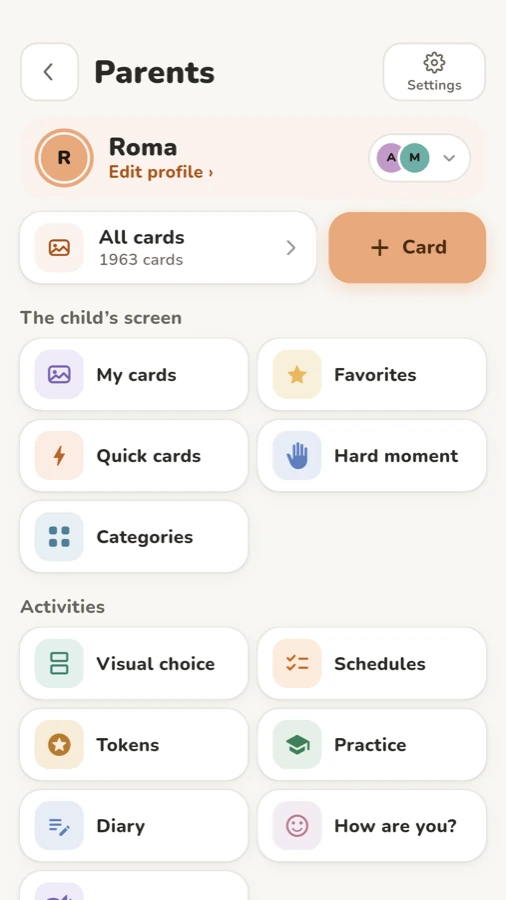
All of this happens in “Parents”, behind a PIN or Face ID.
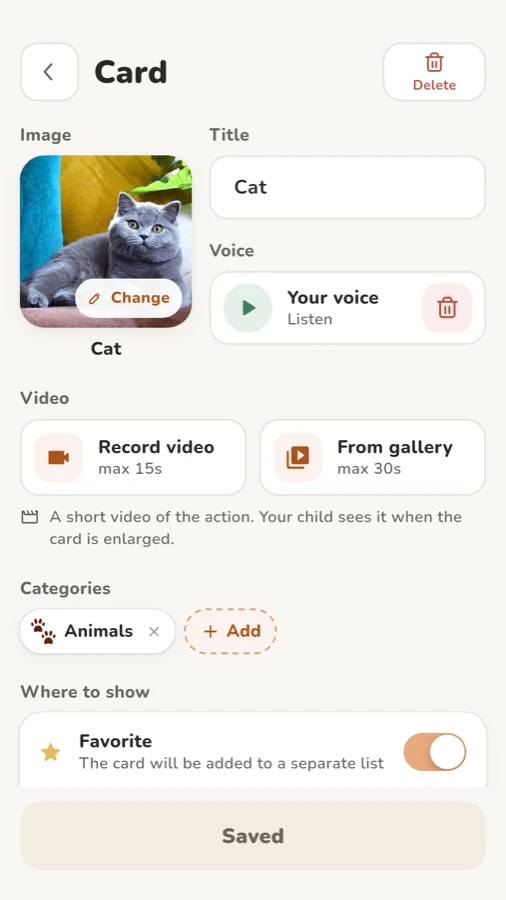
- Open a new card. On the main parent screen, tap “+ Card”. You can also open “All cards” and tap “Add”.
- Add the photo. Tap “Add image”, then “Camera” to shoot it now or “Gallery” to use a photo you already have.
- Crop it. Cards are square, so the “Crop photo” screen opens with a square frame. Move the photo until the object fills it, then confirm.
- Type the title. In the “Title” field, write the word the way your family says it: “Juice”, “Grandma”, “Park”. The card says this word.
- Record your voice. In the “Voice” row, tap “Record a word” (up to 10 seconds), then “Start” and “Stop”. Tap “Your voice” to listen.
- Add a short video if it helps. Under “Video”, choose “Record video” (up to 15 seconds) or “From gallery” (up to 30 seconds). Your child sees the video when the card is enlarged, handy for actions like washing hands.
- Pick categories. In the “Categories” row, tap “Add” and choose where the card belongs. At least one is needed.
- Decide where it shows. Under “Where to show”, turn on “Favorite” to put the card on the “Favorites” tab, or “Hide card” to keep it out of every category for now.
- Save. Tap “Save”. The card appears on your child's screen right away.
No recording yet? The device voice reads it
If you skip step 5, the card still talks: without a recording, the device voice reads the title. You can record later.
On iPhone there's one more option. If you've made a Personal Voice (Apple explains how in Create a Personal Voice on iPhone, iPad, or Mac), go to Parents › Settings and open “My voice (Personal Voice)”. Then cards you haven't recorded can speak in your own voice too. A card with your recording still plays the recording.
Keep only your own cards on the screen
A full library can be a lot at the start. Some families prefer a small board of familiar photos and nothing else.

You have three ways to tidy up:
- Hide single cards. In “All cards”, tap the eye next to a card, or turn on “Hide card” in its editor. The “Hidden” filter shows them all, so nothing is lost.
- Star the important ones. The star next to each card, or “Favorite” in the editor, puts it on the “Favorites” tab your child can always reach.
- Start with a blank board. In Parents › Settings, tap “Start with a blank board”. Only your own cards stay on the home screen. The built-in cards are hidden, not deleted, and “Show built-in cards again” brings them back.
Tabs with no visible cards drop off your child's bar. If the board is about food, my article on making a snack choice board shows how to offer two or three of these photo cards at a time.

Photo cards also work in the phrase bar: a photo of mom, a ready-made “I want” and the juice box from your fridge make one spoken sentence.
Photo tips that make a real difference
- One object per photo. Just the cup, not the cup next to the kettle and the cereal box.
- A plain background. A white table, a wall or a towel behind the object works well.
- Good light. Daylight from a window beats the flash, which adds glare and harsh shadows.
- Shoot the real things at home. Their own shoes, the actual swing at your park, the bus you take to school. That's where photo communication cards beat any library, and it's the real strength of AAC cards with own photos.
- Ask people first. Before you photograph grandma, a teacher or a classmate, ask them, and for children ask their parents too.
- Retake when things change. New cup? Tap “Change” on the photo.
Free cards and Pro
In the free version you can create 15 own cards, and the editor shows how many you have left. That's enough for a starter set. Pro is a one-time purchase, not a subscription, and it removes the limit.
RomaTalk works offline, with no ads and no account. More on that in using AAC offline. You can download RomaTalk for Android, iPhone and iPad.
FAQ
Are real photos better than symbols for AAC?
Not for every child, but many find photos of their own things easier to recognize at first. Start with what your child understands best. Your child's teacher or specialist can help you judge.
How many photo cards should I start with?
A small set of 5 to 10 cards for things your child likes and asks for every day is a good start. Add new ones once your child finds the first ones easily. The free version allows 15 own cards.
Can I use photos I already have on my phone?
Yes. In the card editor, tap “Add image” and then “Gallery”. Crop to a square so the object fills the card.
Do I have to record my voice on every card?
No. Without a recording, the device voice reads the card's title. On iPhone, a Personal Voice can speak cards you haven't recorded.
Questions or ideas? Write to me through RomaTalk support.
 Vistadose
 TwoPillows
 RomaTalk
 Vistadose
 TwoPillows