
Lypii Apps
Vistadose

How to Keep a GLP-1 Injection Site Log

Keep a simple GLP-1 injection site log. Where to inject, why rotation matters, an easy pattern to follow and what to write down after each dose.

Ask someone on a weekly pen where they injected last time, and many will pause. Left side of the stomach or right? A GLP-1 injection site log answers that in a second. It is a short record of where each dose went, so you can move to a fresh spot next time and notice any skin changes early. Below: where to inject, why rotation matters, a pattern you can copy, and what to write down.

Where to inject GLP-1 medicines

The approved areas are set out in the leaflet that comes with your pen, so start there. For the common GLP-1 and related medicines, the labels list three areas for an injection under the skin:

  • Abdomen (stomach area)
  • Thigh (front of the upper leg)
  • Upper arm

The prescribing information for semaglutide names the abdomen, thigh and upper arm, and asks you to use a different site each week when you inject in the same body region. The liraglutide label lists the same three areas and says to change your injection site with each injection.

There are small differences between medicines. The tirzepatide label, for example, says to inject in the abdomen or thigh yourself, and to have another person inject in the back of the upper arm. So read the instructions for your own pen, whether it holds dulaglutide or anything else, rather than a general list. If anything is unclear, ask your nurse, doctor or pharmacist to show you.

Why injection site rotation matters

Injecting into the exact same patch of skin again and again can change the tissue under it. The best-known change is lipohypertrophy: a lump or thickened, rubbery area of fat under the skin. Most of the research on it comes from people who inject insulin, because they inject far more often. Still, the lesson carries over to anyone who injects under the skin.

A large multicentre study of 430 people on insulin found that nearly two-thirds had lipohypertrophy, and that correct site rotation was the strongest protective factor. Another study of people with type 2 diabetes using pens linked not rotating sites and injecting less than about 1 cm from the previous spot with a higher rate of these lumps.

For GLP-1 medicines specifically, the liraglutide label says to rotate within the same region to lower the risk of cutaneous amyloidosis, a rare change in the skin at injection sites. Labels also mention injection site reactions such as redness or discomfort. These are usually mild, but they are easier to judge when you know which dose and which spot they belong to.

A simple rotation pattern you can copy

You do not need a complicated chart. Split the approved areas into zones, then move through them in a fixed order. With three areas and two sides, you get six zones:

  1. Abdomen, left
  2. Abdomen, right
  3. Thigh, left
  4. Thigh, right
  5. Upper arm, left
  6. Upper arm, right

On a weekly pen, going through all six takes six weeks. Each zone gets more than a month off before you come back to it. Here is how that could look:

Week Zone
1 Abdomen, left
2 Abdomen, right
3 Thigh, left
4 Thigh, right
5 Upper arm, left
6 Upper arm, right
7 Back to abdomen, left, in a new spot

A few practical notes:

  • Stay within what your label allows. If your medicine says someone else should inject in the arm, and you inject alone, drop the arm zones and rotate across four.
  • Move within the zone too. When you come back to a zone, pick a spot at least a finger's width away from the last one.
  • On a daily pen, the same order works. You will return to each zone every six days, so moving within the zone matters even more.
  • Skip any spot that is tender, bruised, scarred or lumpy, and tell your care team about it.

If your nurse suggests a different pattern, follow theirs.

What to note in your injection site log

Keep each entry short. For every dose, write:

  • Date and time of the injection
  • Area and side, for example "thigh, right"
  • Skin reaction, if any: redness, itching, a bruise, a lump, pain. Note how long it lasted.
  • Anything unusual, such as a missed or late dose, or a pen that seemed to leak

Once a week or so, run your fingers over the zones you use. Lumps under the skin are often easier to feel than to see. If you find one, avoid that spot and mention it at your next appointment. The appointment checklist can help you remember.

Paper or a notes app both work. Just write the entry right after the dose, while you still remember.

How Vistadose works as an injection site tracker

Vistadose keeps your injection site log inside your dose log, so recording the site is part of the same step as marking the dose taken.
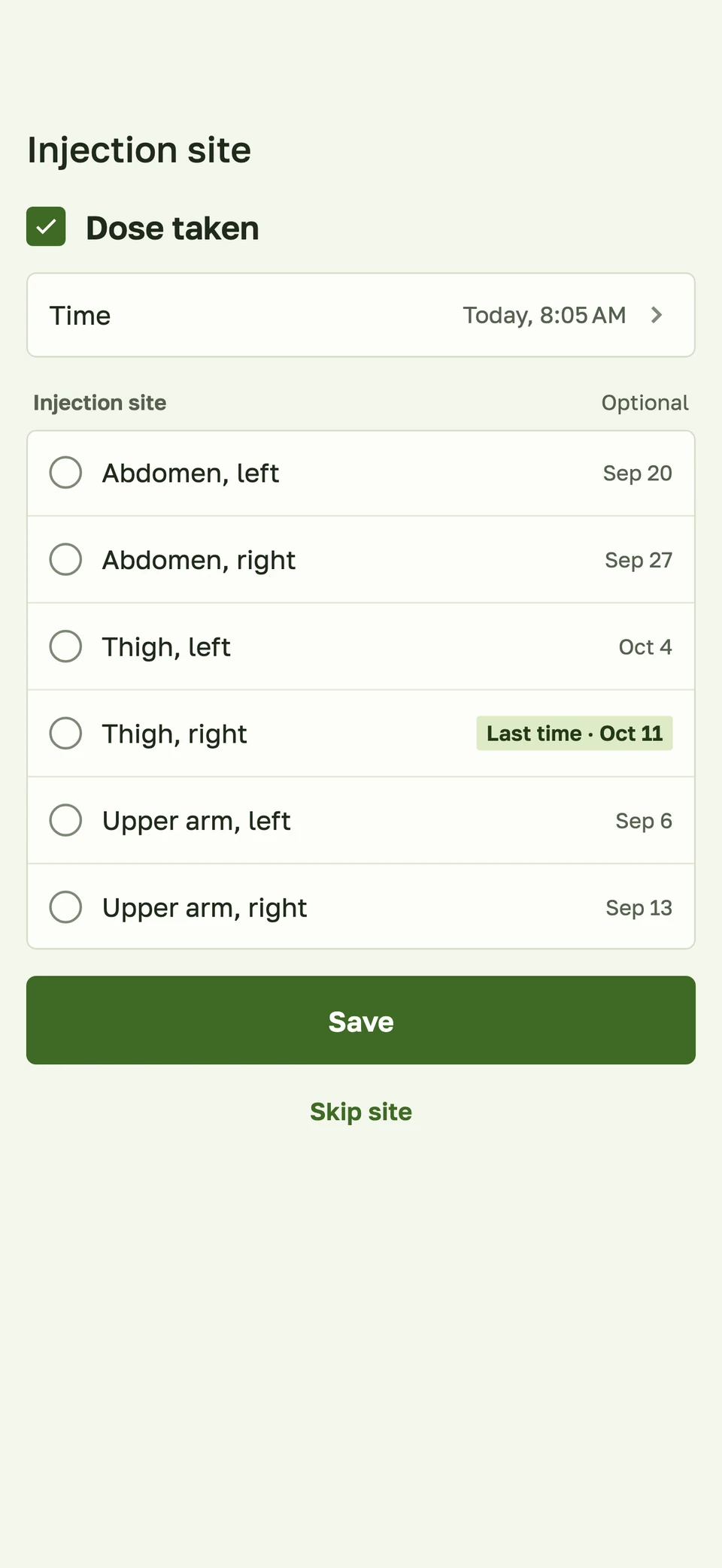
Vistadose screenshot: injection site history with the last time each site was used
Injection site history: each zone shows the date it was last used, and the last site is highlighted.

Here is what happens in the app:

  • After you mark a dose as taken, an "Injection site" sheet opens. It lists six zones: abdomen, thigh and upper arm, each on the left and right. Picking one is optional, so you can tap "Skip site" and the dose is still saved.
  • Each zone shows when you last used it. The most recent one is marked "Last time" with its date. That makes the next zone in your rotation easy to spot.
  • From the reminder. When you log a dose from the notification, an "Add injection site" button opens the app straight to the site choice.
  • On the dose card, a short line such as "last site: left abdomen" reminds you where you went last time.
  • An injection sites card counts how many doses went to each zone, so you can see if one area is getting more than its share.
  • Skin reactions can be logged as a side effect called "Injection site reaction", with a note for your doctor about what happened and how long it lasted. Doses also have an optional note field. For more on symptom notes, see our side effect diary guide.
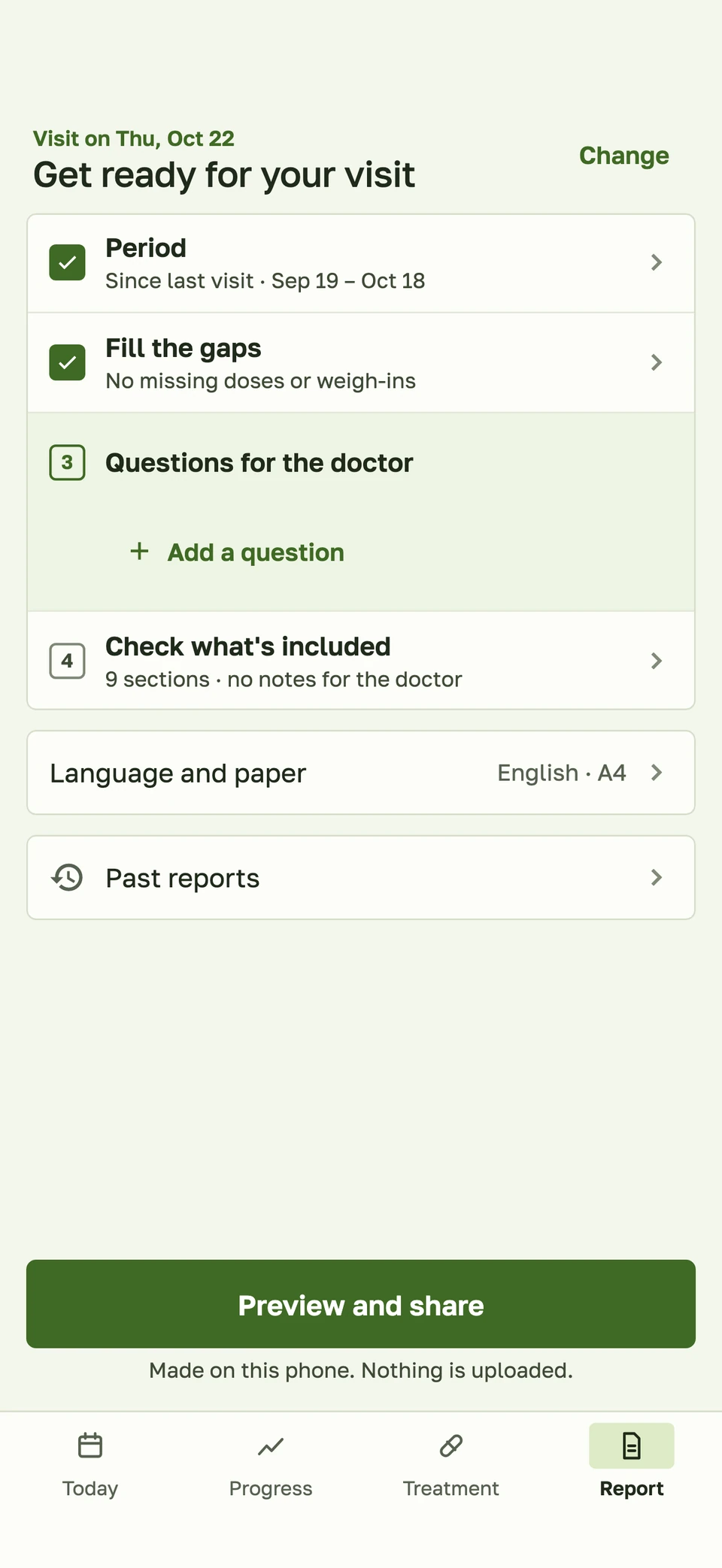
Vistadose screenshot: preparing a report for your doctor
The doctor report is made on your phone. Logged doses appear with their injection site.

When you prepare a PDF report for an appointment, each logged dose is listed together with its site. If you want to see how the rest of your dose record works, read how to keep a GLP-1 injection log.

All of this is part of the free version: the dose log with injection sites, reminders and the doctor report. There is no account and there are no ads. Your data is stored encrypted on your phone, and you can make an encrypted backup to a file or folder you choose.

How Vistadose helps

Vistadose shows your last site the moment you log a dose, keeps the full history for each zone, and puts it in a report you can bring to your doctor. Read more at Vistadose or download Vistadose for iPhone or Android.

FAQ

How often should I change my GLP-1 injection site? The labels for these medicines say to change the site with each injection. On a weekly pen, that means a new spot every week. Your pen's instructions and your care team have the final word.

Can I use the same area every week if I move the spot? Some labels allow the same body region as long as the exact spot is different each time. Moving between areas as well, as in the six-zone pattern above, gives each patch of skin a longer rest.

What should I do if I get a lump or a red patch? Avoid that spot for your next injections, write down what you see and when it started, and tell your nurse or doctor. Get medical help quickly if the reaction is severe or spreading.

Is Vistadose's injection site log free? Yes. Logging doses with injection sites, reminders and the doctor report are all in the free version.

Vistadose is not a medical device and does not replace advice from your doctor.
Lypii Apps
Vistadose

How to Keep a GLP-1 Injection Site Log

Keep a simple GLP-1 injection site log. Where to inject, why rotation matters, an easy pattern to follow and what to write down after each dose.

Ask someone on a weekly pen where they injected last time, and many will pause. Left side of the stomach or right? A GLP-1 injection site log answers that in a second. It is a short record of where each dose went, so you can move to a fresh spot next time and notice any skin changes early. Below: where to inject, why rotation matters, a pattern you can copy, and what to write down.

Where to inject GLP-1 medicines

The approved areas are set out in the leaflet that comes with your pen, so start there. For the common GLP-1 and related medicines, the labels list three areas for an injection under the skin:

  • Abdomen (stomach area)
  • Thigh (front of the upper leg)
  • Upper arm

The prescribing information for semaglutide names the abdomen, thigh and upper arm, and asks you to use a different site each week when you inject in the same body region. The liraglutide label lists the same three areas and says to change your injection site with each injection.

There are small differences between medicines. The tirzepatide label, for example, says to inject in the abdomen or thigh yourself, and to have another person inject in the back of the upper arm. So read the instructions for your own pen, whether it holds dulaglutide or anything else, rather than a general list. If anything is unclear, ask your nurse, doctor or pharmacist to show you.

Why injection site rotation matters

Injecting into the exact same patch of skin again and again can change the tissue under it. The best-known change is lipohypertrophy: a lump or thickened, rubbery area of fat under the skin. Most of the research on it comes from people who inject insulin, because they inject far more often. Still, the lesson carries over to anyone who injects under the skin.

A large multicentre study of 430 people on insulin found that nearly two-thirds had lipohypertrophy, and that correct site rotation was the strongest protective factor. Another study of people with type 2 diabetes using pens linked not rotating sites and injecting less than about 1 cm from the previous spot with a higher rate of these lumps.

For GLP-1 medicines specifically, the liraglutide label says to rotate within the same region to lower the risk of cutaneous amyloidosis, a rare change in the skin at injection sites. Labels also mention injection site reactions such as redness or discomfort. These are usually mild, but they are easier to judge when you know which dose and which spot they belong to.

A simple rotation pattern you can copy

You do not need a complicated chart. Split the approved areas into zones, then move through them in a fixed order. With three areas and two sides, you get six zones:

  1. Abdomen, left
  2. Abdomen, right
  3. Thigh, left
  4. Thigh, right
  5. Upper arm, left
  6. Upper arm, right

On a weekly pen, going through all six takes six weeks. Each zone gets more than a month off before you come back to it. Here is how that could look:

Week Zone
1 Abdomen, left
2 Abdomen, right
3 Thigh, left
4 Thigh, right
5 Upper arm, left
6 Upper arm, right
7 Back to abdomen, left, in a new spot

A few practical notes:

  • Stay within what your label allows. If your medicine says someone else should inject in the arm, and you inject alone, drop the arm zones and rotate across four.
  • Move within the zone too. When you come back to a zone, pick a spot at least a finger's width away from the last one.
  • On a daily pen, the same order works. You will return to each zone every six days, so moving within the zone matters even more.
  • Skip any spot that is tender, bruised, scarred or lumpy, and tell your care team about it.

If your nurse suggests a different pattern, follow theirs.

What to note in your injection site log

Keep each entry short. For every dose, write:

  • Date and time of the injection
  • Area and side, for example "thigh, right"
  • Skin reaction, if any: redness, itching, a bruise, a lump, pain. Note how long it lasted.
  • Anything unusual, such as a missed or late dose, or a pen that seemed to leak

Once a week or so, run your fingers over the zones you use. Lumps under the skin are often easier to feel than to see. If you find one, avoid that spot and mention it at your next appointment. The appointment checklist can help you remember.

Paper or a notes app both work. Just write the entry right after the dose, while you still remember.

How Vistadose works as an injection site tracker

Vistadose keeps your injection site log inside your dose log, so recording the site is part of the same step as marking the dose taken.

Vistadose screenshot: injection site history with the last time each site was used
Injection site history: each zone shows the date it was last used, and the last site is highlighted.

Here is what happens in the app:

  • After you mark a dose as taken, an "Injection site" sheet opens. It lists six zones: abdomen, thigh and upper arm, each on the left and right. Picking one is optional, so you can tap "Skip site" and the dose is still saved.
  • Each zone shows when you last used it. The most recent one is marked "Last time" with its date. That makes the next zone in your rotation easy to spot.
  • From the reminder. When you log a dose from the notification, an "Add injection site" button opens the app straight to the site choice.
  • On the dose card, a short line such as "last site: left abdomen" reminds you where you went last time.
  • An injection sites card counts how many doses went to each zone, so you can see if one area is getting more than its share.
  • Skin reactions can be logged as a side effect called "Injection site reaction", with a note for your doctor about what happened and how long it lasted. Doses also have an optional note field. For more on symptom notes, see our side effect diary guide.
Vistadose screenshot: preparing a report for your doctor
The doctor report is made on your phone. Logged doses appear with their injection site.

When you prepare a PDF report for an appointment, each logged dose is listed together with its site. If you want to see how the rest of your dose record works, read how to keep a GLP-1 injection log.

All of this is part of the free version: the dose log with injection sites, reminders and the doctor report. There is no account and there are no ads. Your data is stored encrypted on your phone, and you can make an encrypted backup to a file or folder you choose.

How Vistadose helps

Vistadose shows your last site the moment you log a dose, keeps the full history for each zone, and puts it in a report you can bring to your doctor. Read more at Vistadose or download Vistadose for iPhone or Android.

FAQ

How often should I change my GLP-1 injection site? The labels for these medicines say to change the site with each injection. On a weekly pen, that means a new spot every week. Your pen's instructions and your care team have the final word.

Can I use the same area every week if I move the spot? Some labels allow the same body region as long as the exact spot is different each time. Moving between areas as well, as in the six-zone pattern above, gives each patch of skin a longer rest.

What should I do if I get a lump or a red patch? Avoid that spot for your next injections, write down what you see and when it started, and tell your nurse or doctor. Get medical help quickly if the reaction is severe or spreading.

Is Vistadose's injection site log free? Yes. Logging doses with injection sites, reminders and the doctor report are all in the free version.

Vistadose is not a medical device and does not replace advice from your doctor.

ABOUT THIS APPVistadoseKeep a private record of your GLP-1 doses, injection sites and side effects. See how you feel between doses and bring a PDF report to your next appointment.
SHARE
Lypii AppsContact
Vistadose

How to Keep a GLP-1 Injection Site Log

Keep a simple GLP-1 injection site log. Where to inject, why rotation matters, an easy pattern to follow and what to write down after each dose.

Ask someone on a weekly pen where they injected last time, and many will pause. Left side of the stomach or right? A GLP-1 injection site log answers that in a second. It is a short record of where each dose went, so you can move to a fresh spot next time and notice any skin changes early. Below: where to inject, why rotation matters, a pattern you can copy, and what to write down.

Where to inject GLP-1 medicines

The approved areas are set out in the leaflet that comes with your pen, so start there. For the common GLP-1 and related medicines, the labels list three areas for an injection under the skin:

  • Abdomen (stomach area)
  • Thigh (front of the upper leg)
  • Upper arm

The prescribing information for semaglutide names the abdomen, thigh and upper arm, and asks you to use a different site each week when you inject in the same body region. The liraglutide label lists the same three areas and says to change your injection site with each injection.

There are small differences between medicines. The tirzepatide label, for example, says to inject in the abdomen or thigh yourself, and to have another person inject in the back of the upper arm. So read the instructions for your own pen, whether it holds dulaglutide or anything else, rather than a general list. If anything is unclear, ask your nurse, doctor or pharmacist to show you.

Why injection site rotation matters

Injecting into the exact same patch of skin again and again can change the tissue under it. The best-known change is lipohypertrophy: a lump or thickened, rubbery area of fat under the skin. Most of the research on it comes from people who inject insulin, because they inject far more often. Still, the lesson carries over to anyone who injects under the skin.

A large multicentre study of 430 people on insulin found that nearly two-thirds had lipohypertrophy, and that correct site rotation was the strongest protective factor. Another study of people with type 2 diabetes using pens linked not rotating sites and injecting less than about 1 cm from the previous spot with a higher rate of these lumps.

For GLP-1 medicines specifically, the liraglutide label says to rotate within the same region to lower the risk of cutaneous amyloidosis, a rare change in the skin at injection sites. Labels also mention injection site reactions such as redness or discomfort. These are usually mild, but they are easier to judge when you know which dose and which spot they belong to.

A simple rotation pattern you can copy

You do not need a complicated chart. Split the approved areas into zones, then move through them in a fixed order. With three areas and two sides, you get six zones:

  1. Abdomen, left
  2. Abdomen, right
  3. Thigh, left
  4. Thigh, right
  5. Upper arm, left
  6. Upper arm, right

On a weekly pen, going through all six takes six weeks. Each zone gets more than a month off before you come back to it. Here is how that could look:

Week Zone
1 Abdomen, left
2 Abdomen, right
3 Thigh, left
4 Thigh, right
5 Upper arm, left
6 Upper arm, right
7 Back to abdomen, left, in a new spot

A few practical notes:

  • Stay within what your label allows. If your medicine says someone else should inject in the arm, and you inject alone, drop the arm zones and rotate across four.
  • Move within the zone too. When you come back to a zone, pick a spot at least a finger's width away from the last one.
  • On a daily pen, the same order works. You will return to each zone every six days, so moving within the zone matters even more.
  • Skip any spot that is tender, bruised, scarred or lumpy, and tell your care team about it.

If your nurse suggests a different pattern, follow theirs.

What to note in your injection site log

Keep each entry short. For every dose, write:

  • Date and time of the injection
  • Area and side, for example "thigh, right"
  • Skin reaction, if any: redness, itching, a bruise, a lump, pain. Note how long it lasted.
  • Anything unusual, such as a missed or late dose, or a pen that seemed to leak

Once a week or so, run your fingers over the zones you use. Lumps under the skin are often easier to feel than to see. If you find one, avoid that spot and mention it at your next appointment. The appointment checklist can help you remember.

Paper or a notes app both work. Just write the entry right after the dose, while you still remember.

How Vistadose works as an injection site tracker

Vistadose keeps your injection site log inside your dose log, so recording the site is part of the same step as marking the dose taken.

Vistadose screenshot: injection site history with the last time each site was used
Injection site history: each zone shows the date it was last used, and the last site is highlighted.

Here is what happens in the app:

  • After you mark a dose as taken, an "Injection site" sheet opens. It lists six zones: abdomen, thigh and upper arm, each on the left and right. Picking one is optional, so you can tap "Skip site" and the dose is still saved.
  • Each zone shows when you last used it. The most recent one is marked "Last time" with its date. That makes the next zone in your rotation easy to spot.
  • From the reminder. When you log a dose from the notification, an "Add injection site" button opens the app straight to the site choice.
  • On the dose card, a short line such as "last site: left abdomen" reminds you where you went last time.
  • An injection sites card counts how many doses went to each zone, so you can see if one area is getting more than its share.
  • Skin reactions can be logged as a side effect called "Injection site reaction", with a note for your doctor about what happened and how long it lasted. Doses also have an optional note field. For more on symptom notes, see our side effect diary guide.
Vistadose screenshot: preparing a report for your doctor
The doctor report is made on your phone. Logged doses appear with their injection site.

When you prepare a PDF report for an appointment, each logged dose is listed together with its site. If you want to see how the rest of your dose record works, read how to keep a GLP-1 injection log.

All of this is part of the free version: the dose log with injection sites, reminders and the doctor report. There is no account and there are no ads. Your data is stored encrypted on your phone, and you can make an encrypted backup to a file or folder you choose.

How Vistadose helps

Vistadose shows your last site the moment you log a dose, keeps the full history for each zone, and puts it in a report you can bring to your doctor. Read more at Vistadose or download Vistadose for iPhone or Android.

FAQ

How often should I change my GLP-1 injection site? The labels for these medicines say to change the site with each injection. On a weekly pen, that means a new spot every week. Your pen's instructions and your care team have the final word.

Can I use the same area every week if I move the spot? Some labels allow the same body region as long as the exact spot is different each time. Moving between areas as well, as in the six-zone pattern above, gives each patch of skin a longer rest.

What should I do if I get a lump or a red patch? Avoid that spot for your next injections, write down what you see and when it started, and tell your nurse or doctor. Get medical help quickly if the reaction is severe or spreading.

Is Vistadose's injection site log free? Yes. Logging doses with injection sites, reminders and the doctor report are all in the free version.

Vistadose is not a medical device and does not replace advice from your doctor.

ABOUT THIS APPVistadoseKeep a private record of your GLP-1 doses, injection sites and side effects. See how you feel between doses and bring a PDF report to your next appointment.
SHARE