

You open the cupboard and ask "What do you want?". When your child doesn't speak, or spoken words are hard to follow, that question can hang in the air with nothing to hold on to. A snack choice board turns the question into something your child can see and touch: two pictures, one tap, and the snack arrives.
Here is why a real choice matters, how many options to start with, and how to build the board in RomaTalk with photos of your own snacks.
Why a choice between real options helps
A choice board is just a visual way of showing what is available right now. The University of New Mexico's Center for Development and Disability describes it with a familiar example: instead of asking "juice or milk?", you hold up a photo of each and let your child pick (UNM parent resource on visual supports). The same guide points out that spoken words disappear the moment they are said, while a picture stays in front of your child for as long as they need it.
There is a second reason, and it has nothing to do with pictures. AssistiveWare's article on choice and control talks about making decisions with a person rather than for them (AssistiveWare, 3 strategies to support choice and control). Snack time is one of the easiest places in the day to start. It happens every day, and your child sees that their answer changes what happens next.
Parents sometimes worry that pictures will replace talking. The American Speech-Language-Hearing Association (ASHA) lists the idea that AAC reduces motivation to speak as a misconception (ASHA Practice Portal on AAC). A picture choice board gives your child a way to answer today, without waiting.
I learned this in a café, not from a book. Before RomaTalk existed, I would let my son Roma choose a dish from a photo on my phone. When the options are right in front of you, it is easier to understand each other.
How many options should a snack choice board have?
Start with two. The UNM guide suggests offering only two or three choices while a child is learning to choose, and adding more once they have the idea. The guide built into RomaTalk gives the same advice: two cards, one of which your child surely likes.
Two is a real decision, and your child can take in both at a glance. Once your child picks reliably, try three. A RomaTalk set holds 2 to 6 cards.
Fewer is also calmer. With Roma, I noticed that it is easier for him to choose when only the offered options are in front of him, not a whole screen of everything he could ever ask for.
Use photos of the snacks in your cupboard
Vanderbilt Kennedy Center's tip sheet on choice boards recommends using photos of the actual object when possible, because they look most like the real thing (Vanderbilt Kennedy Center, Choice Boards: An Overview). A drawing of "crackers" may look nothing like the orange box on your kitchen shelf.
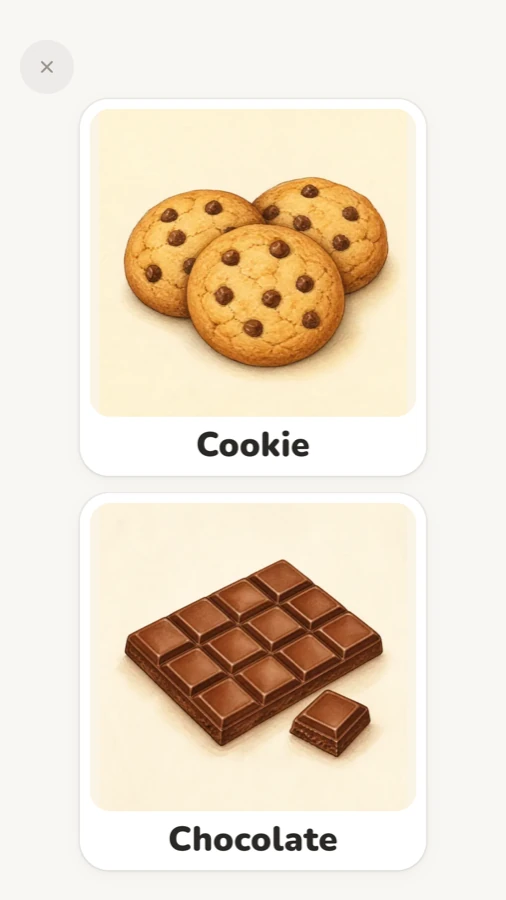
RomaTalk already has almost 2,000 ready-made cards, including snacks like the Cookie and Chocolate you see below. But if your child knows one particular yoghurt pot or one brand of rice cakes, take a photo of it. The full process is in making AAC cards with your own photos.
The same tip sheet gives a rule worth keeping: only show what is really available. If the biscuits ran out yesterday, take that card out of the set.
How to make your own snack cards
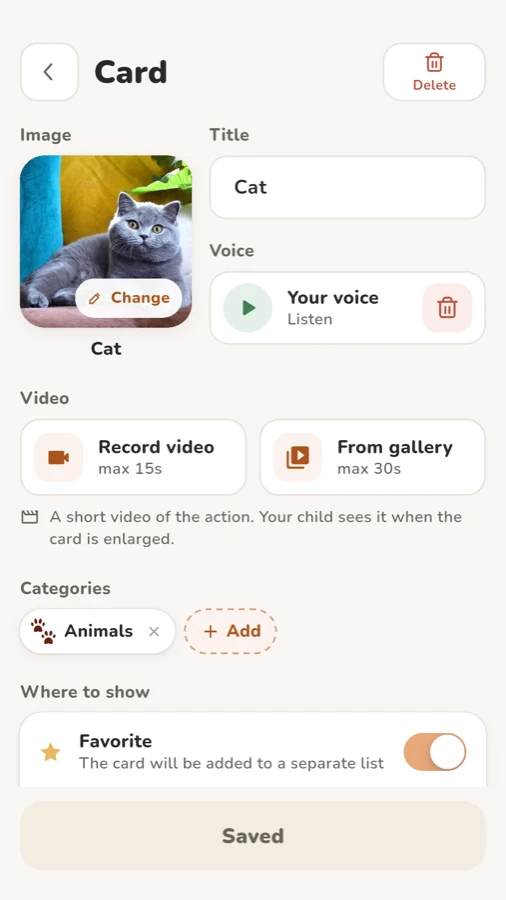
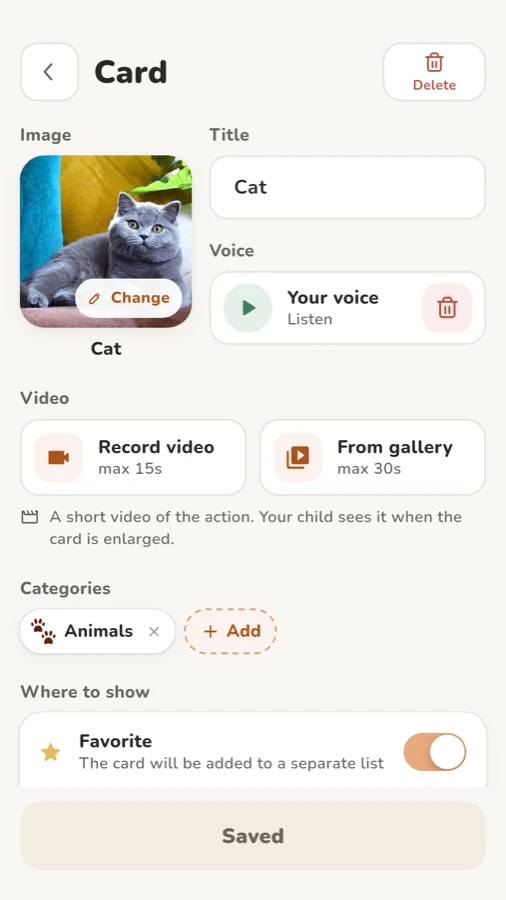
- Open Parents (it is behind your PIN or Face ID) and tap “+ Card” at the top.
- Tap “Add image” and choose “Camera” to photograph the snack, or “Gallery” for a photo you already have.
- Type a short “Title”, such as "Rice cakes". The device voice reads the title, or you can tap “Record” under “Voice” and say the word yourself.
- Pick a category and tap “Save”.
How to set up the snack choice board in Visual choice
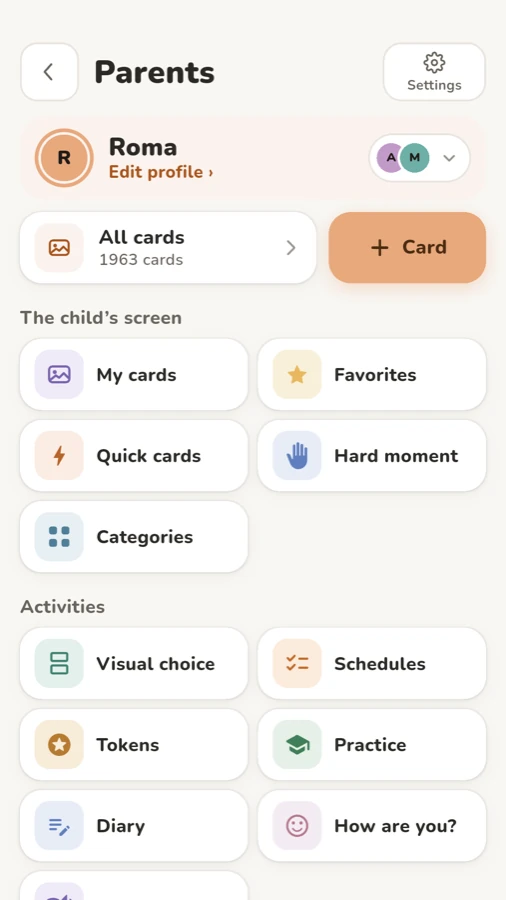
- On the Parents screen, open “Visual choice” under Activities. You will see the “Your choice” screen with the current set.
- Tap the set name under the title to open “Sets”, then tap “Create set”.
- In the “New set” window, type a “Set name” (for example "Snack"), choose “Cards in the set” (start with 2) and tap “Create”.
- Tap “Add a card” for each place. You can pick from “Recent”, “All”, a category, or “Search cards” to find your own photo cards.
- If you like, choose a “Phrase opening” such as “I want”. Then a tap on Cookie speaks the whole phrase, “I want” plus the snack, as one sentence.
- Go back to “Your choice”, tap “Show” and hand your child the phone or tablet.
In show mode there is no header, no buttons and no set name. Your child sees only the cards. A tap says the word and makes the card big. To leave, press and hold the small × in the corner for two seconds. A quick tap only shows “Hold to leave”, and the system back button does nothing, so a curious finger can't close it by accident.
Check that the choice is a real choice
Once your child picks the same favourite every time, try a small check: swap the second card for a food they always push away. If your child still goes straight to the favourite, you know they are looking at the pictures and choosing, not just tapping the top card.
If they tap the snack they dislike, calmly give it anyway. This isn't a test your child can fail. It just shows you what the board means to them right now. You can also tap “Edit” and drag the cards to swap their positions, so the favourite isn't always in the same spot.
Honour the choice, every time
Vanderbilt's tip sheet says to give the chosen item right away. RomaTalk's own guide puts it the same way: a choice is made, so give what was chosen, even if you expected something else.
If your child picks chocolate before dinner and you don't want that, the fix is in the set, not at the moment of choice. Next time, only offer options you are happy to give. Saying "no" after the tap tells your child the tap doesn't count.
Save sets for familiar situations and add drinks
Each set is saved, so you can keep a "Snack" set, a "Drinks" set with juice, water and milk, and maybe a "Café" set for the place you go on Saturdays. Switch between them from “Sets”. The free version includes two sets: the basic one and one of your own. Pro, a one-time purchase, has no limit.
Drinks are a natural next step, with exactly the same steps. Many families also pair a choice set with a First Then board: first wash hands, then choose a snack.
RomaTalk also has a “Visual choice” home screen widget on Android and iPhone. It shows up to four cards of one set, and a tap opens them in the app.
FAQ
What is a snack choice board? It is a small set of pictures that shows which snacks are available right now. Your child points to or taps one, and you give that snack.
How many snack options should I offer at first? Two, with one that your child clearly likes. Add a third when your child chooses reliably.
Should I use photos or drawings? Photos of the actual snack usually work best, because they look like the packet your child already knows.
Does RomaTalk need the internet for this? No. RomaTalk works offline, with no ads and no account, so the board works at grandma's or in a café without Wi-Fi. You can download RomaTalk for Android, iPhone and iPad, or read more on the RomaTalk home page.
 Vistadose
 TwoPillows
 RomaTalk
 Vistadose
 TwoPillows