
Lypii Apps
RomaTalk

Using AAC Offline: Preparing Your Phone for a Day Out

Using AAC offline on a day out? A practical checklist for the zoo, a car trip or the airport: voices, sound, battery, app pinning and the right cards.

Picture the zoo gate: no signal, a low battery and a child who needs to tell you something right now. This guide is about using AAC offline: what to check the evening before, so the communication app on your phone just works wherever you end up.

I'm writing this as a parent first. My son Roma is autistic and doesn't speak, and crowded places are especially hard for him: the noise, the unfamiliar surroundings, so much going on at once. A familiar order of events calms him. That's a big part of why I built RomaTalk to work fully offline, and why I prepare the phone before we leave.

Why AAC has to work everywhere

The American Speech-Language-Hearing Association (ASHA) puts it plainly in its guidance on augmentative and alternative communication: people who use AAC should always have access to their communication tools. The same page notes that a device may not be as effective if it's used only at home and not in other situations.

A day out is exactly one of those other situations: grandma's kitchen, the back seat, the queue at airport security.

Does RomaTalk work without internet?

Yes. RomaTalk has no account, no ads and no sign in, and everything lives on the phone. On Android the app doesn't even ask for internet access, so there's nothing it could wait for. Your cards, photos, recordings and settings are all stored on the device.

That makes using AAC offline the normal case. But the app depends on a few things on the phone itself, and those are worth checking.
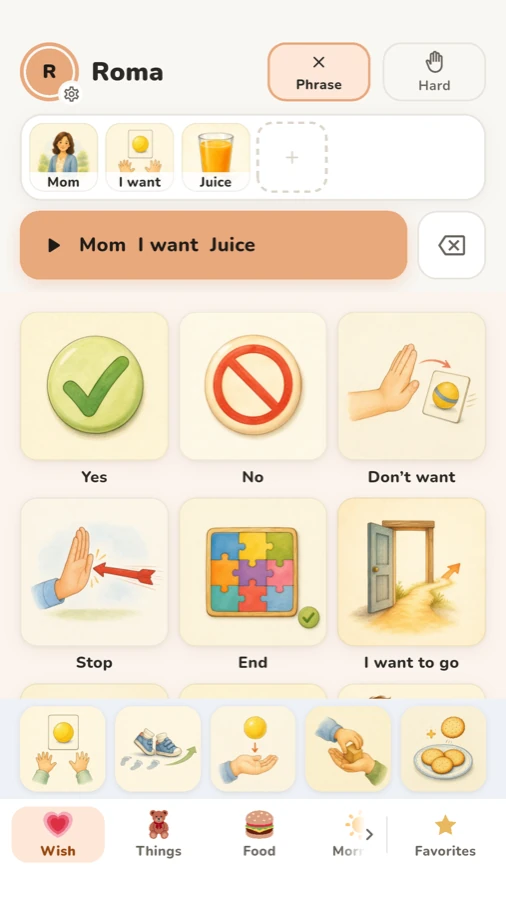
RomaTalk child screen with the phrase Mom I want Juice and a row of quick cards above the tabs
The child's screen works the same at home and at the zoo, signal or not.

Your checklist for using AAC offline

1. Install the voice for your language

RomaTalk reads cards with the phone's own text to speech voice. If the voice for the card language isn't installed, cards without a recording stay silent. Download it at home on Wi-Fi.

On Android, the voice data comes from the text to speech engine; Google explains where to find it on its text to speech output help page. On iPhone, voices are downloaded in Settings, under Accessibility. In RomaTalk, Parents › Settings shows a “Card voice” row that says “Installed” or “Not installed”.

2. Run “Sound check”

I never skip this one.

  1. Open Parents and tap Settings.
  2. In “Voice and phrase”, tap “Sound check”.
  3. The app says a test word and tells you what blocks the sound, if anything.
  4. Fix what it shows, then tap “Check again”.

It catches “Sound is off”, “Very quiet”, “Sound goes to Bluetooth” (the car stereo is a classic), “Sound goes to headphones” and “No voice for this language”. If the phone is very quiet and you're heading somewhere noisy, the same group has a “Loud” switch. On Android it raises the volume to maximum while the voice speaks, then puts it back. It isn't raised with headphones.

3. Record your own voice on the key cards

A recording on a card plays as it is. It doesn't depend on the voice engine at all. So for the handful of cards your child will need most today ("toilet", "drink", "home", the name of the place), open the card, tap “Record” in the “Voice” row and say the word the way you say it at home.

4. Charge, and plan for the battery

Charge fully and pack a power bank. Apple describes Low Power Mode for iPhone, and most Android phones have a battery saver in Settings › Battery.

Keep your child inside the app

One stray swipe and your child is in the camera or a video app, and the cards are gone.

On Android, RomaTalk can pin itself. In the Parents area there's a “Pin the app” switch (“Locks the exit from the app”), and in Parents › Settings there's “Automatically pin the app on launch”. Google's page on pinning screens explains how unpinning works on your phone.

On iPhone and iPad, apps can't pin themselves, so RomaTalk shows the steps for Guided Access instead. Open Settings › Accessibility › Guided Access, turn Guided Access on, then return to RomaTalk and triple click the side button. Apple's Guided Access guide covers the passcode and session options. One small thing to know: while Guided Access is on, Face ID and Touch ID don't open the Parents area, so remember your PIN.
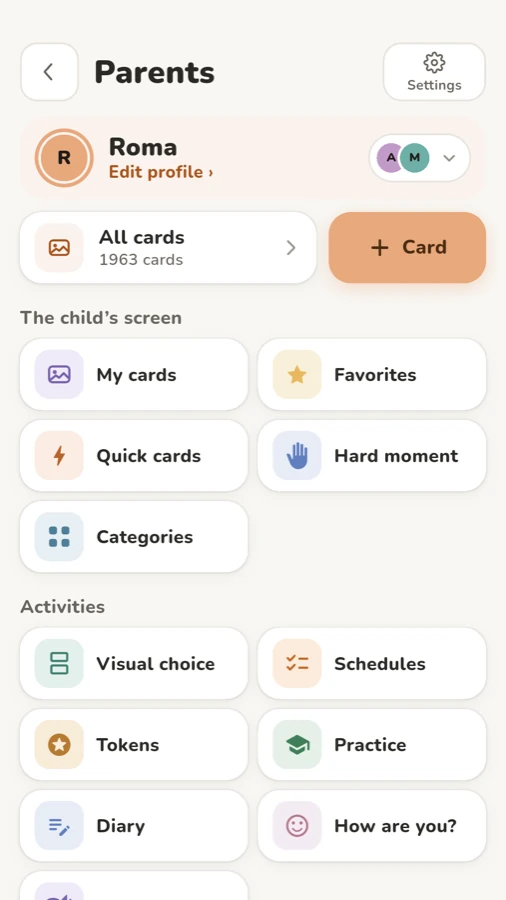
The Parents area in RomaTalk with Quick cards, Favorites, Hard moment and Categories
Quick cards, Favorites and Hard moment all live in the Parents area.

Put the right cards within reach

When everything is loud and new, scrolling through tabs is too much.

  • Quick cards. A panel that stays on every tab the child opens. Fill it with “I want”, “Help”, “More”, the toilet. It's in the Parents area under “Quick cards”.
  • Favorites. Star the cards for the trip and they all appear on the child's “Favorites” tab.
  • Hard moment. A button at the top of the child's screen opens up to six big cards on a plain background, with no tabs and no animation, for when the board itself is too much. You choose the cards in the Parents area under “Hard moment”. If you don't see the button, check that “Hard moment” is on in Parents › Settings, in the group “The child's tabs”.

Make a "day out" category with real photos

The library already has travel cards such as “Airplane cabin” and “Airport”. But a photo of the actual zoo gate or grandma's front door means more to many children. If your child already knows photo cards, see AAC cards with your own photos.

  1. Open Parents, then “Categories”, and tap “Add”.
  2. Give it a name, for example "Zoo", pick an icon and tap “Create category”.
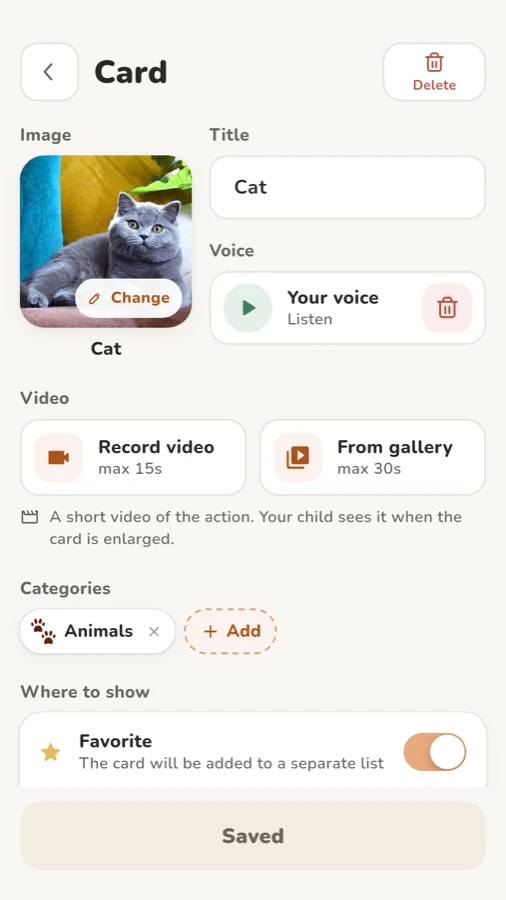
  3. Tap “+ Card”, then “Add image” and “Camera” or “Gallery”.
  4. Type the word in “Title” and record it in the “Voice” row.
  5. In the card's categories, add your new one and tap “Save”.

Take the photos a few days before. Once they're in the app, they don't need a signal.
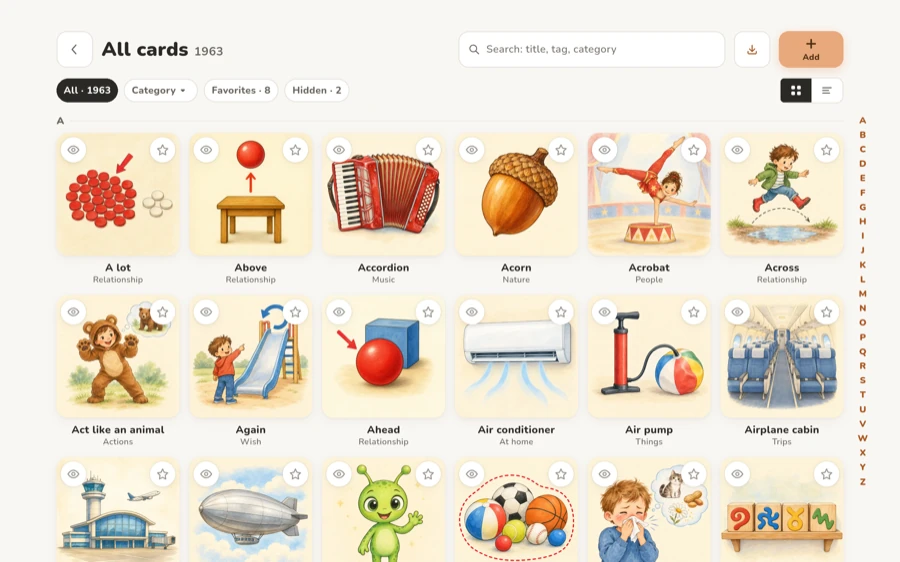
All cards library on a tablet, including travel cards such as Airplane cabin and Airport
The library already has travel cards. Add your own photos next to them.

Show the day before it happens

Predictability helps Roma, and many families find the same. RomaTalk's “Stories” are pictures and short lines about what is coming, and a voice reads each line. There's a ready-made story called “A visit”, which fits a trip to grandparents, and you can make your own: "We get in the car. We see the giraffes. Then we go home." Look at it together the evening before. If the order of the day matters, a First Then board can help on the spot.

Back up before you travel

Phones get dropped at airports. “Make full backup” in Parents › Settings creates an encrypted file with your photos, recordings and everything you entered, and you can protect it with a password. Backup is part of Pro, the one-time purchase. If you need help, the RomaTalk support page is the place to ask.

FAQ

Can I use an AAC app with no signal at all?

With RomaTalk, yes. It has no account and stores everything on the phone, so using AAC offline works the same on a plane, in the countryside or in a basement café. Just install the text to speech voice before you leave.

Why is the app silent even though the volume is up?

Usually the sound is going to Bluetooth or headphones, or the voice for the card language isn't installed. Run “Sound check” in Parents › Settings and it will tell you which one.

How do I stop my child from leaving the app?

On Android, turn on “Pin the app” in the Parents area. On iPhone and iPad, use Guided Access: the app shows the steps under the same “Pin the app” row.

A little preparation the evening before can make the day calmer for everyone. You can download RomaTalk for Android, iPhone and iPad, or read more on the RomaTalk home page.
Lypii Apps
RomaTalk

Using AAC Offline: Preparing Your Phone for a Day Out

Using AAC offline on a day out? A practical checklist for the zoo, a car trip or the airport: voices, sound, battery, app pinning and the right cards.

Picture the zoo gate: no signal, a low battery and a child who needs to tell you something right now. This guide is about using AAC offline: what to check the evening before, so the communication app on your phone just works wherever you end up.

I'm writing this as a parent first. My son Roma is autistic and doesn't speak, and crowded places are especially hard for him: the noise, the unfamiliar surroundings, so much going on at once. A familiar order of events calms him. That's a big part of why I built RomaTalk to work fully offline, and why I prepare the phone before we leave.

Why AAC has to work everywhere

The American Speech-Language-Hearing Association (ASHA) puts it plainly in its guidance on augmentative and alternative communication: people who use AAC should always have access to their communication tools. The same page notes that a device may not be as effective if it's used only at home and not in other situations.

A day out is exactly one of those other situations: grandma's kitchen, the back seat, the queue at airport security.

Does RomaTalk work without internet?

Yes. RomaTalk has no account, no ads and no sign in, and everything lives on the phone. On Android the app doesn't even ask for internet access, so there's nothing it could wait for. Your cards, photos, recordings and settings are all stored on the device.

That makes using AAC offline the normal case. But the app depends on a few things on the phone itself, and those are worth checking.

RomaTalk child screen with the phrase Mom I want Juice and a row of quick cards above the tabs
The child's screen works the same at home and at the zoo, signal or not.

Your checklist for using AAC offline

1. Install the voice for your language

RomaTalk reads cards with the phone's own text to speech voice. If the voice for the card language isn't installed, cards without a recording stay silent. Download it at home on Wi-Fi.

On Android, the voice data comes from the text to speech engine; Google explains where to find it on its text to speech output help page. On iPhone, voices are downloaded in Settings, under Accessibility. In RomaTalk, Parents › Settings shows a “Card voice” row that says “Installed” or “Not installed”.

2. Run “Sound check”

I never skip this one.

  1. Open Parents and tap Settings.
  2. In “Voice and phrase”, tap “Sound check”.
  3. The app says a test word and tells you what blocks the sound, if anything.
  4. Fix what it shows, then tap “Check again”.

It catches “Sound is off”, “Very quiet”, “Sound goes to Bluetooth” (the car stereo is a classic), “Sound goes to headphones” and “No voice for this language”. If the phone is very quiet and you're heading somewhere noisy, the same group has a “Loud” switch. On Android it raises the volume to maximum while the voice speaks, then puts it back. It isn't raised with headphones.

3. Record your own voice on the key cards

A recording on a card plays as it is. It doesn't depend on the voice engine at all. So for the handful of cards your child will need most today ("toilet", "drink", "home", the name of the place), open the card, tap “Record” in the “Voice” row and say the word the way you say it at home.

4. Charge, and plan for the battery

Charge fully and pack a power bank. Apple describes Low Power Mode for iPhone, and most Android phones have a battery saver in Settings › Battery.

Keep your child inside the app

One stray swipe and your child is in the camera or a video app, and the cards are gone.

On Android, RomaTalk can pin itself. In the Parents area there's a “Pin the app” switch (“Locks the exit from the app”), and in Parents › Settings there's “Automatically pin the app on launch”. Google's page on pinning screens explains how unpinning works on your phone.

On iPhone and iPad, apps can't pin themselves, so RomaTalk shows the steps for Guided Access instead. Open Settings › Accessibility › Guided Access, turn Guided Access on, then return to RomaTalk and triple click the side button. Apple's Guided Access guide covers the passcode and session options. One small thing to know: while Guided Access is on, Face ID and Touch ID don't open the Parents area, so remember your PIN.

The Parents area in RomaTalk with Quick cards, Favorites, Hard moment and Categories
Quick cards, Favorites and Hard moment all live in the Parents area.

Put the right cards within reach

When everything is loud and new, scrolling through tabs is too much.

  • Quick cards. A panel that stays on every tab the child opens. Fill it with “I want”, “Help”, “More”, the toilet. It's in the Parents area under “Quick cards”.
  • Favorites. Star the cards for the trip and they all appear on the child's “Favorites” tab.
  • Hard moment. A button at the top of the child's screen opens up to six big cards on a plain background, with no tabs and no animation, for when the board itself is too much. You choose the cards in the Parents area under “Hard moment”. If you don't see the button, check that “Hard moment” is on in Parents › Settings, in the group “The child's tabs”.

Make a "day out" category with real photos

The library already has travel cards such as “Airplane cabin” and “Airport”. But a photo of the actual zoo gate or grandma's front door means more to many children. If your child already knows photo cards, see AAC cards with your own photos.

  1. Open Parents, then “Categories”, and tap “Add”.
  2. Give it a name, for example "Zoo", pick an icon and tap “Create category”.
  3. Tap “+ Card”, then “Add image” and “Camera” or “Gallery”.
  4. Type the word in “Title” and record it in the “Voice” row.
  5. In the card's categories, add your new one and tap “Save”.

Take the photos a few days before. Once they're in the app, they don't need a signal.

All cards library on a tablet, including travel cards such as Airplane cabin and Airport
The library already has travel cards. Add your own photos next to them.

Show the day before it happens

Predictability helps Roma, and many families find the same. RomaTalk's “Stories” are pictures and short lines about what is coming, and a voice reads each line. There's a ready-made story called “A visit”, which fits a trip to grandparents, and you can make your own: "We get in the car. We see the giraffes. Then we go home." Look at it together the evening before. If the order of the day matters, a First Then board can help on the spot.

Back up before you travel

Phones get dropped at airports. “Make full backup” in Parents › Settings creates an encrypted file with your photos, recordings and everything you entered, and you can protect it with a password. Backup is part of Pro, the one-time purchase. If you need help, the RomaTalk support page is the place to ask.

FAQ

Can I use an AAC app with no signal at all?

With RomaTalk, yes. It has no account and stores everything on the phone, so using AAC offline works the same on a plane, in the countryside or in a basement café. Just install the text to speech voice before you leave.

Why is the app silent even though the volume is up?

Usually the sound is going to Bluetooth or headphones, or the voice for the card language isn't installed. Run “Sound check” in Parents › Settings and it will tell you which one.

How do I stop my child from leaving the app?

On Android, turn on “Pin the app” in the Parents area. On iPhone and iPad, use Guided Access: the app shows the steps under the same “Pin the app” row.

A little preparation the evening before can make the day calmer for everyone. You can download RomaTalk for Android, iPhone and iPad, or read more on the RomaTalk home page.

ABOUT THIS APPRomaTalkTap a picture to hear the word, or put several cards together to say a whole phrase. Add your own photos and voice, and use RomaTalk offline.
SHARE
Lypii AppsContact
RomaTalk

Using AAC Offline: Preparing Your Phone for a Day Out

Using AAC offline on a day out? A practical checklist for the zoo, a car trip or the airport: voices, sound, battery, app pinning and the right cards.

Picture the zoo gate: no signal, a low battery and a child who needs to tell you something right now. This guide is about using AAC offline: what to check the evening before, so the communication app on your phone just works wherever you end up.

I'm writing this as a parent first. My son Roma is autistic and doesn't speak, and crowded places are especially hard for him: the noise, the unfamiliar surroundings, so much going on at once. A familiar order of events calms him. That's a big part of why I built RomaTalk to work fully offline, and why I prepare the phone before we leave.

Why AAC has to work everywhere

The American Speech-Language-Hearing Association (ASHA) puts it plainly in its guidance on augmentative and alternative communication: people who use AAC should always have access to their communication tools. The same page notes that a device may not be as effective if it's used only at home and not in other situations.

A day out is exactly one of those other situations: grandma's kitchen, the back seat, the queue at airport security.

Does RomaTalk work without internet?

Yes. RomaTalk has no account, no ads and no sign in, and everything lives on the phone. On Android the app doesn't even ask for internet access, so there's nothing it could wait for. Your cards, photos, recordings and settings are all stored on the device.

That makes using AAC offline the normal case. But the app depends on a few things on the phone itself, and those are worth checking.

RomaTalk child screen with the phrase Mom I want Juice and a row of quick cards above the tabs
The child's screen works the same at home and at the zoo, signal or not.

Your checklist for using AAC offline

1. Install the voice for your language

RomaTalk reads cards with the phone's own text to speech voice. If the voice for the card language isn't installed, cards without a recording stay silent. Download it at home on Wi-Fi.

On Android, the voice data comes from the text to speech engine; Google explains where to find it on its text to speech output help page. On iPhone, voices are downloaded in Settings, under Accessibility. In RomaTalk, Parents › Settings shows a “Card voice” row that says “Installed” or “Not installed”.

2. Run “Sound check”

I never skip this one.

  1. Open Parents and tap Settings.
  2. In “Voice and phrase”, tap “Sound check”.
  3. The app says a test word and tells you what blocks the sound, if anything.
  4. Fix what it shows, then tap “Check again”.

It catches “Sound is off”, “Very quiet”, “Sound goes to Bluetooth” (the car stereo is a classic), “Sound goes to headphones” and “No voice for this language”. If the phone is very quiet and you're heading somewhere noisy, the same group has a “Loud” switch. On Android it raises the volume to maximum while the voice speaks, then puts it back. It isn't raised with headphones.

3. Record your own voice on the key cards

A recording on a card plays as it is. It doesn't depend on the voice engine at all. So for the handful of cards your child will need most today ("toilet", "drink", "home", the name of the place), open the card, tap “Record” in the “Voice” row and say the word the way you say it at home.

4. Charge, and plan for the battery

Charge fully and pack a power bank. Apple describes Low Power Mode for iPhone, and most Android phones have a battery saver in Settings › Battery.

Keep your child inside the app

One stray swipe and your child is in the camera or a video app, and the cards are gone.

On Android, RomaTalk can pin itself. In the Parents area there's a “Pin the app” switch (“Locks the exit from the app”), and in Parents › Settings there's “Automatically pin the app on launch”. Google's page on pinning screens explains how unpinning works on your phone.

On iPhone and iPad, apps can't pin themselves, so RomaTalk shows the steps for Guided Access instead. Open Settings › Accessibility › Guided Access, turn Guided Access on, then return to RomaTalk and triple click the side button. Apple's Guided Access guide covers the passcode and session options. One small thing to know: while Guided Access is on, Face ID and Touch ID don't open the Parents area, so remember your PIN.

The Parents area in RomaTalk with Quick cards, Favorites, Hard moment and Categories
Quick cards, Favorites and Hard moment all live in the Parents area.

Put the right cards within reach

When everything is loud and new, scrolling through tabs is too much.

  • Quick cards. A panel that stays on every tab the child opens. Fill it with “I want”, “Help”, “More”, the toilet. It's in the Parents area under “Quick cards”.
  • Favorites. Star the cards for the trip and they all appear on the child's “Favorites” tab.
  • Hard moment. A button at the top of the child's screen opens up to six big cards on a plain background, with no tabs and no animation, for when the board itself is too much. You choose the cards in the Parents area under “Hard moment”. If you don't see the button, check that “Hard moment” is on in Parents › Settings, in the group “The child's tabs”.

Make a "day out" category with real photos

The library already has travel cards such as “Airplane cabin” and “Airport”. But a photo of the actual zoo gate or grandma's front door means more to many children. If your child already knows photo cards, see AAC cards with your own photos.

  1. Open Parents, then “Categories”, and tap “Add”.
  2. Give it a name, for example "Zoo", pick an icon and tap “Create category”.
  3. Tap “+ Card”, then “Add image” and “Camera” or “Gallery”.
  4. Type the word in “Title” and record it in the “Voice” row.
  5. In the card's categories, add your new one and tap “Save”.

Take the photos a few days before. Once they're in the app, they don't need a signal.

All cards library on a tablet, including travel cards such as Airplane cabin and Airport
The library already has travel cards. Add your own photos next to them.

Show the day before it happens

Predictability helps Roma, and many families find the same. RomaTalk's “Stories” are pictures and short lines about what is coming, and a voice reads each line. There's a ready-made story called “A visit”, which fits a trip to grandparents, and you can make your own: "We get in the car. We see the giraffes. Then we go home." Look at it together the evening before. If the order of the day matters, a First Then board can help on the spot.

Back up before you travel

Phones get dropped at airports. “Make full backup” in Parents › Settings creates an encrypted file with your photos, recordings and everything you entered, and you can protect it with a password. Backup is part of Pro, the one-time purchase. If you need help, the RomaTalk support page is the place to ask.

FAQ

Can I use an AAC app with no signal at all?

With RomaTalk, yes. It has no account and stores everything on the phone, so using AAC offline works the same on a plane, in the countryside or in a basement café. Just install the text to speech voice before you leave.

Why is the app silent even though the volume is up?

Usually the sound is going to Bluetooth or headphones, or the voice for the card language isn't installed. Run “Sound check” in Parents › Settings and it will tell you which one.

How do I stop my child from leaving the app?

On Android, turn on “Pin the app” in the Parents area. On iPhone and iPad, use Guided Access: the app shows the steps under the same “Pin the app” row.

A little preparation the evening before can make the day calmer for everyone. You can download RomaTalk for Android, iPhone and iPad, or read more on the RomaTalk home page.

ABOUT THIS APPRomaTalkTap a picture to hear the word, or put several cards together to say a whole phrase. Add your own photos and voice, and use RomaTalk offline.
SHARE