

It's 9 pm. Your child is asleep. You finally have a minute.
You take a photo of the new swimming pool. You record your voice: "Swimming". The card is ready.
Tomorrow morning, your child grabs the tablet. The card isn't there.
It's on your phone. Not on the tablet. And not on your partner's phone either.
So you wait for a free moment. You take the tablet away. Your child is upset. You build the same card again.
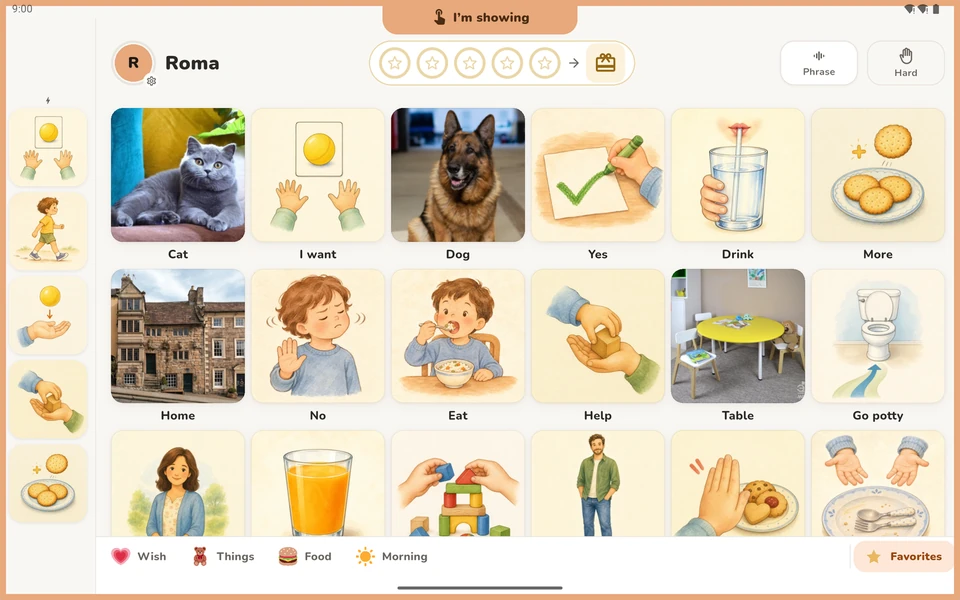
Sound familiar? RomaTalk 1.0.377 ends this. With Family devices, you can use one AAC app on multiple devices. You make a card once. It appears on every phone and tablet in your family by itself.
Why this matters more than it sounds
An AAC system is never finished. Your child's life changes. New places, new people, a new favourite snack. The cards have to keep up.
Speech and language specialists were asked why families stop using AAC. One reason they named most often was "Not Maintaining/Adjusting the System" (Johnson et al., 2006).
The family matters too. The American Speech-Language-Hearing Association (ASHA) puts it plainly: "lack of family involvement in the AAC process is cited as a significant factor in device abandonment" (ASHA Practice Portal).
And the adults don't just watch. They show the cards themselves. A meta-analysis found this kind of showing "highly effective across participants of various ages, disabilities, and language skills" (O'Neill et al., 2018). Studies that teach parents usually teach three skills: show the cards, wait, ask open questions (Kent-Walsh et al., 2015).
So here's the simple point. Every adult who shows the cards needs the same cards as the child. In the same places. On every device.
What goes wrong without sync
| Situation | What happens |
|---|---|
| Dad updates the cards | Mom's phone and the tablet fall behind |
| Both parents add cards | Two different sets grow on two phones |
| The tablet needs a new card | Someone has to take it from the child |
| A schedule changes | You rebuild it on every device |
| The tablet is in use all day | Updates wait until bedtime, or never happen |
Parents of autistic children already carry a lot. One meta-analysis found much higher parenting stress than in other families, with "a large effect size" (Hayes & Watson, 2013). Doing the same setup three times is the first chore to get dropped.
What makes Family devices different
Moving cards between devices usually means a backup file, a shared account, or doing it twice by hand. Family devices works another way.
| Family devices in RomaTalk | |
|---|---|
| Account | None. No email, no password |
| How devices connect | A QR code, valid for 10 minutes |
| Who can read your cards | Only your devices. They're encrypted before they leave the phone |
| The child's tablet | Needs no Pro. It receives everything |
| Both parents at once | Yes. Changes to different fields are both kept |
| Without internet | Everything works as before. Sync waits for the network |
| Server storage | Up to 72 hours, until every device has the changes |
Family devices is the only part of RomaTalk that goes online. Turn it off, and nothing leaves your devices. More on that in Using AAC offline.
A day with three synced devices
Picture a family with two parents and one child.
- Dad's phone has Pro. He creates the family. He makes most cards, schedules and categories.
- Mom's phone has Pro too. She adds cards when she thinks of them. At the shop. At grandma's.
- The child's tablet has no Pro. It just receives.
In the morning, Dad adds "Swimming". A few seconds later, his phone sends it. The tablet picks it up the next time it checks. No one touches the tablet.
At lunch, Mom adds "Grandma's dog". It reaches Dad's phone and the tablet the same way.
In the evening, both parents work in the app at once. Each adds what feels important. Nobody has to ask, "Did you add that one?"
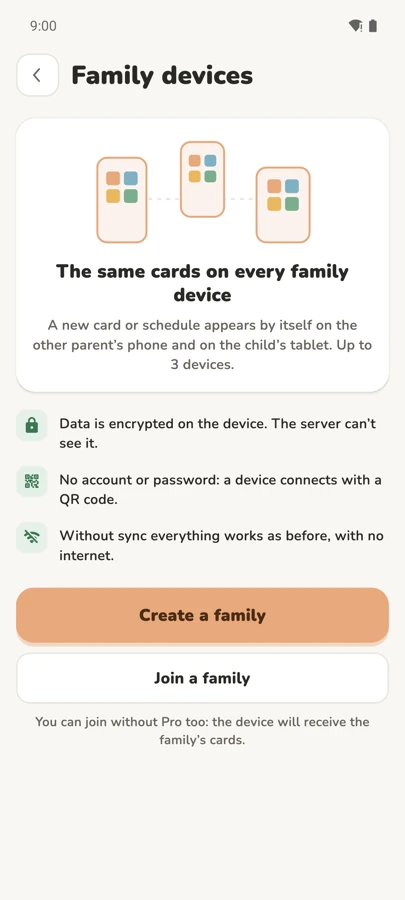
How to set up an AAC app on multiple devices
You need RomaTalk 1.0.377 or later on every device. You also need internet while you set it up. It takes a few minutes.
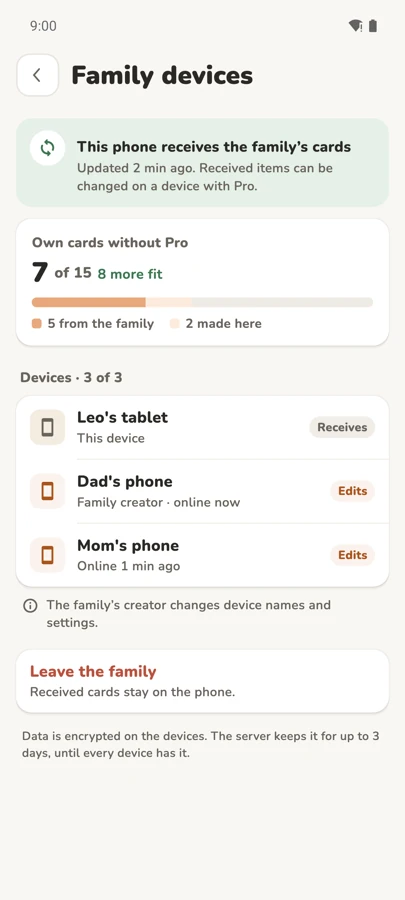
- On the phone with Pro, open Parents. Find the App card. Tap “Family devices”.
- Tap “Create a family”. Name this device, for example "Dad's phone".
- Tap “Add a device”. A QR code appears. It works once and lasts 10 minutes.
- On the other device, open Parents › “Family devices”. Tap “Join a family”.
- Tap “Photograph the code”. Take a photo of the code on the first phone. Or tap “Choose a photo of the code” and pick a saved picture.
- Name the new device, for example "Leo's tablet".
- Choose where each child's cards go. A device with Pro sees “Is this the same child?”. A device without Pro picks one child.
- Keep RomaTalk open on the first phone until the new device is done.
Do steps 3 to 8 again for the third device.
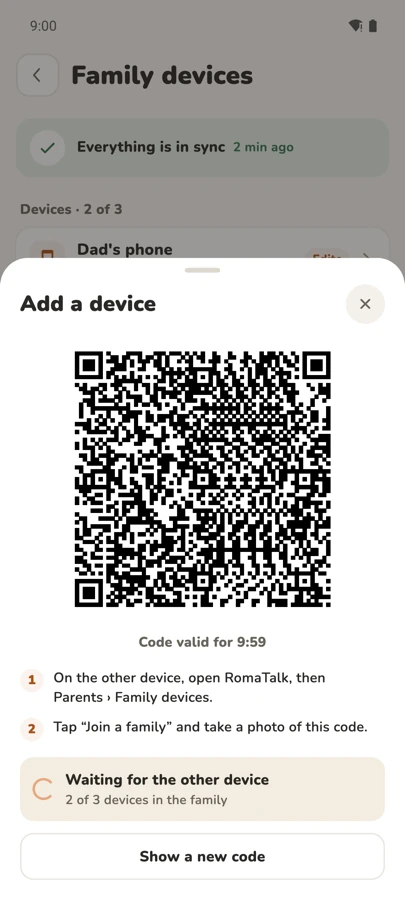
The one-minute trick for the tablet
You do need the tablet once, to join it. Keep it short:
- Take a screenshot of the QR code on your phone.
- Send it to the tablet by message or email.
- Save it on the tablet.
- Tap “Choose a photo of the code” and pick it.
Then delete the screenshot from the chat. The code works only once and expires in 10 minutes. Still, it's tidier not to leave it lying around.
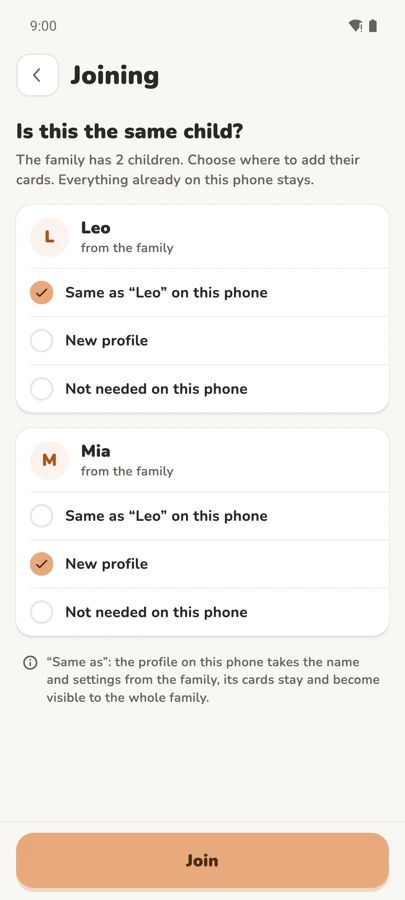
Who edits and who receives
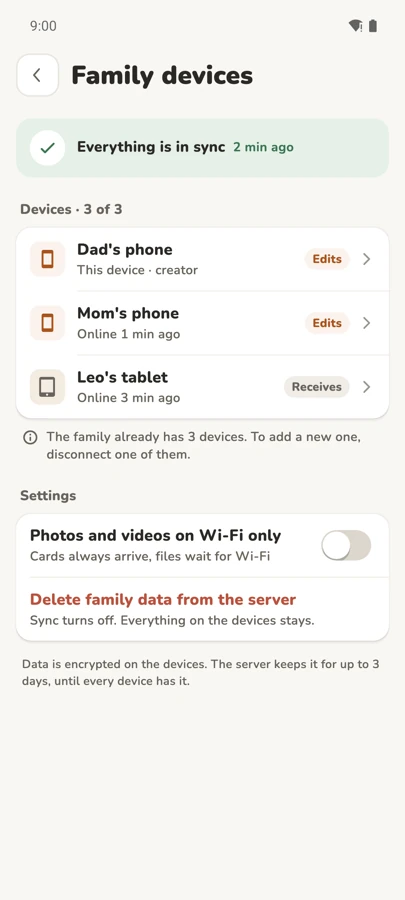
Every device has a role. You see it on the family list.
| Device with Pro | Device without Pro | |
|---|---|---|
| Role | Edits | Receives |
| Gets cards, schedules, categories | Yes | Yes |
| Can change what others made | Yes | No |
| Can create a family | Yes | No, only join |
A family has up to three devices. The device that creates it needs Pro.
On iPhone and iPad, Pro shared through Apple Family Sharing counts. So your partner's iPhone in the same Apple family can edit too. On Android, every device signed in to the same Google account has Pro.
The tablet doesn't need Pro. The child uses every card it receives. One detail: received own cards count toward the 15 free own cards. To change them, use a phone with Pro.
What syncs, and what stays put
Almost everything you build is shared. A few things belong to one device.
| Shared with the family | Kept on each device |
|---|---|
| Profiles and most child settings | Practice results and statistics |
| Cards, with photos, videos and recordings | Card use counts and “Recent” |
| Categories | Grid size and large text |
| Schedules and stories | The quick panel |
| Choice sets | Speech speed and touch timing |
| Practices and lesson plans | Tokens and today's schedule marks |
| The diary |
What if both parents edit the same card? The last change to each field wins. Mom renames it, Dad swaps the photo. Both changes stay.
On mobile data? Turn on “Photos and videos on Wi-Fi only”. Cards still arrive at once. Files follow on Wi-Fi.
How fast do new cards arrive?
Fast. Not instant. And only while the app is open.
- After you edit, your device waits about 7 seconds. Then it sends the changes.
- Other devices check every 30 seconds while RomaTalk is on screen.
- If nothing changes, they check less often, up to every 5 minutes. After a change, it's 30 seconds again.
- Every device also checks the moment you open the app.
With both apps open, a new card usually arrives in under a minute. Nothing syncs while RomaTalk is closed or in the background. There are no push notifications.
Your privacy, in plain words
- No account. No email. No password. Just a QR code.
- Encrypted on your phone. Cards, photos and names are locked with AES-256-GCM before they leave. The server passes them on. It can't read them.
- Short storage. The server keeps changes until every device has them. 72 hours at most.
- You're in charge. Only the family's creator can disconnect a device. Only the creator can tap “Delete family data from the server”.
- Silence ends it. If no device checks in for 13 months, the family is deleted from the server.
Whatever happens, the cards on your devices stay. A disconnected device keeps everything. It just stops updating.
Your first week with a synced family
| Day | Try this |
|---|---|
| Day 1 | Create the family. Join the tablet with a screenshot of the code |
| Day 2 | Join the other parent's phone. Check all three devices on the list |
| Day 3 | Add a card with your photo and voice. Watch it reach the tablet (how to make photo cards) |
| Day 4 | Let the other parent add a card |
| Day 5 | Change a schedule step on your phone, not on the tablet |
| Weekend | Take the tablet out. Nobody needs to touch it |
FAQ
Does the child's tablet need Pro?
No. It joins as a receiver. It gets all the family's cards, schedules and categories. Changes to them are made on a device with Pro.
Do both parents need to buy Pro?
Only if both want to edit. On iPhone and iPad, Apple Family Sharing covers the other parent. On Android, one Google account covers every device. Without Pro, a phone can still join as a receiver.
How many devices can be in one family?
Three. To add a new one, the creator first disconnects another.
What if we stop using sync?
The creator can delete the family data from the server. Any device can leave the family. Either way, the cards stay. RomaTalk keeps working offline.
Sources
- Johnson, J. M., Inglebret, E., Jones, C., & Ray, J. (2006). Perspectives of speech language pathologists regarding success versus abandonment of AAC. Augmentative and Alternative Communication, 22(2), 85-99. https://pubmed.ncbi.nlm.nih.gov/17114167/
Abandonment was most often linked to "Not Maintaining/Adjusting the System, Attitude, Lack of Training, Lack of Support, and Poor Fit."
- American Speech-Language-Hearing Association. Augmentative and Alternative Communication (Practice Portal). https://www.asha.org/practice-portal/professional-issues/augmentative-and-alternative-communication/
"Lack of family involvement in the AAC process is cited as a significant factor in device abandonment."
- O'Neill, T., Light, J., & Pope, L. (2018). Effects of interventions that include aided augmentative and alternative communication input on the communication of individuals with complex communication needs: A meta-analysis. Journal of Speech, Language, and Hearing Research, 61(7), 1743-1765. https://doi.org/10.1044/2018_JSLHR-L-17-0132
Such approaches "were found to be highly effective across participants of various ages, disabilities, and language skills."
- Kent-Walsh, J., Murza, K. A., Malani, M. D., & Binger, C. (2015). Effects of communication partner instruction on the communication of individuals using AAC: A meta-analysis. Augmentative and Alternative Communication, 31(4), 271-284. https://doi.org/10.3109/07434618.2015.1052153
"Aided AAC modeling, expectant delay, and open-ended question asking were the most frequently targeted communication partner interaction skills."
- Moorcroft, A., Scarinci, N., & Meyer, C. (2019). Speech pathologist perspectives on the acceptance versus rejection or abandonment of AAC systems for children with complex communication needs. Augmentative and Alternative Communication, 35(3), 193-204. https://doi.org/10.1080/07434618.2019.1609577
Themes included "Support Networks Around Parents" and "The Capacity of and Demands on Parents".
- Hayes, S. A., & Watson, S. L. (2013). The impact of parenting stress: A meta-analysis of studies comparing the experience of parenting stress in parents of children with and without autism spectrum disorder. Journal of Autism and Developmental Disorders, 43, 629-642. https://doi.org/10.1007/s10803-012-1604-y
The comparison with families of typically developing children "resulted in a large effect size."
RomaTalk is a communication and learning tool. Parents can also keep private notes and see simple counts of what they recorded, and read general information written for parents. It is not a medical device, and it does not diagnose, assess or treat anything.
 Vistadose
 TwoPillows
 Calmanota